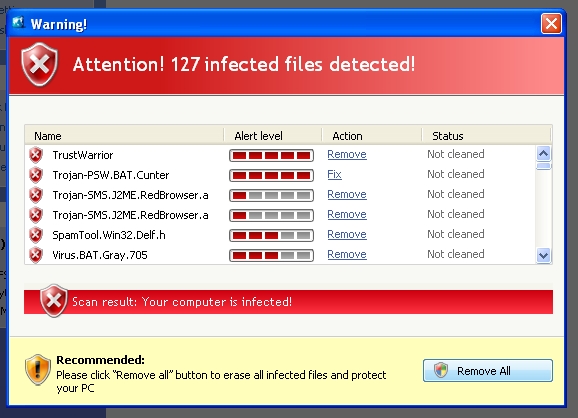
Someone showed me a computer this weekend with a virus that I could not even beat in safe mode. All I could do was to re-install Windows. The best I could do was to get the task bar to pop up for a split second. In safe mode the computer just restarts into regular mode and went back to this screen.
I had to use a camera to take a picture of it.
Another problem is that Malwayre-Bytes anti Malware (MBAM) no longer offers a thorough search and even once I re-installed windows it did not detect the virus as it was in "Old Windows". Then there is Microsoft security essentials that will not do a scan unless you are connected to the Internet to do an update.....
Showing posts with label Virus War. Show all posts
Monday, June 23, 2014
Monday, April 22, 2013
Removing the CNet Download virus
Recently while working on a website, I noticed that some words were being underlined. I did not make them links so I scrolled over the words and this popped up:
I immediately realized that I had a virus in my computer. What on earth does "Sermons" have to do with eating bananas? What total nonsense? I tried scanning my computer with MSE and MBAM to no avail. So I went to add/remove programs and there it was "GetSavin". It easily removed itself that way.
I did some research and this virus comes from going to download.com (download.cnet.com) and they install it on your computer. There was the day when I trusted download.com, I have long since learned to steer clear of them. They install things on your computer without your permission and then activate it whenever they want.
I immediately realized that I had a virus in my computer. What on earth does "Sermons" have to do with eating bananas? What total nonsense? I tried scanning my computer with MSE and MBAM to no avail. So I went to add/remove programs and there it was "GetSavin". It easily removed itself that way.
I did some research and this virus comes from going to download.com (download.cnet.com) and they install it on your computer. There was the day when I trusted download.com, I have long since learned to steer clear of them. They install things on your computer without your permission and then activate it whenever they want.
Wednesday, August 22, 2012
Removing AVG 2102
Is AVG 2012 a virus?
I had to remove AVG 2012 from a computer the other day. First I tried "AddRemove" programs from the control panel but it did not work. Then I tried CCleaner but it could not remove it. I could not even manually shut AVG 2012 down from "Windows Task Manager".
Finally I restarted the computer in "safe mode" and located C:\Program Files\AVG and AVG2012. I then deleted the entire directories. When I restarted the computer and I ran CCleaner to fix all of the registry errors. Next I installed "Microsoft Security essentials". Now the computer runs much faster and uses a lot less memory.
I had to remove AVG 2012 from a computer the other day. First I tried "AddRemove" programs from the control panel but it did not work. Then I tried CCleaner but it could not remove it. I could not even manually shut AVG 2012 down from "Windows Task Manager".
Finally I restarted the computer in "safe mode" and located C:\Program Files\AVG and AVG2012. I then deleted the entire directories. When I restarted the computer and I ran CCleaner to fix all of the registry errors. Next I installed "Microsoft Security essentials". Now the computer runs much faster and uses a lot less memory.
Wednesday, March 16, 2011
Cleaning up after the Palladium Virus & Cohorts
A computer recently was infected by the Palladium virus twice. The first time Malware bytes anti-malware and Windows Defender claimed to have it fixed. However after checking the log files I looked in C:\documents and settings\networkservice\application data I discovered that there were a lot of left over files that had the infection. It creates random files of its infection so it can reinfect the computer. You need to manually remove these files.
First look for the batch files, they are a 3 or 4 digit number followed by '.bat'. I renamed one as '.txt' so I could safely look at it and sure enough it re installs the virus. Next get the JavaScript files they are random letters followed by '.js'. Again they reinstall the virus. Then there was a '.dat' file also bearing the same creation date. I do not know if it needs to be deleted or not. Also delete any random letters followed by '.exe' files. The anti-virus program should have removed them but there may be some left behind. The big giveaway is the random letters and the creation date all being the date of the computers infection.
In the picture I put a box around the files left over after the infection.
First look for the batch files, they are a 3 or 4 digit number followed by '.bat'. I renamed one as '.txt' so I could safely look at it and sure enough it re installs the virus. Next get the JavaScript files they are random letters followed by '.js'. Again they reinstall the virus. Then there was a '.dat' file also bearing the same creation date. I do not know if it needs to be deleted or not. Also delete any random letters followed by '.exe' files. The anti-virus program should have removed them but there may be some left behind. The big giveaway is the random letters and the creation date all being the date of the computers infection.
In the picture I put a box around the files left over after the infection.
Wednesday, February 9, 2011
Palladium Fake anti-virus
I just had the 'palladium fake anti-virus' attack a computer. To fix it I first restarted in safe mode and then installed Malware Bytes AntiMalware (MBAM) ran a full system scan and it removed all but 7 files. They were all located at "C:\Documents and Settings\NetworkService\Application Data" and all of them had today's date as their creation date. I manually deleted them, emptied the recycle bin and restarted the computer. I also ran CCleaner and it deleted all of the temporary files.
I also had to reinstall MS Office as MS Outlook was trashed and would not run even in safe mode.
MBAM Log file:
Malwarebytes' Anti-Malware 1.50.1.1100
www.malwarebytes.org
Database version: 5721
Windows 5.1.2600 Service Pack 3
Internet Explorer 7.0.5730.13
2/9/2011 12:59:34 PM
mbam-log-2011-02-09 (12-59-34).txt
Scan type: Full scan (C:\|D:\|)
Objects scanned: 221304
Time elapsed: 28 minute(s), 0 second(s)
Memory Processes Infected: 0
Memory Modules Infected: 0
Registry Keys Infected: 0
Registry Values Infected: 1
Registry Data Items Infected: 0
Folders Infected: 0
Files Infected: 6
Memory Processes Infected:
(No malicious items detected)
Memory Modules Infected:
(No malicious items detected)
Registry Keys Infected:
(No malicious items detected)
Registry Values Infected:
HKEY_CURRENT_USER\Software\Microsoft\Windows NT\CurrentVersion\Winlogon\Shell (Rogue.Palladium) ->
Value: Shell -> Quarantined and deleted successfully.
Registry Data Items Infected:
(No malicious items detected)
Folders Infected:
(No malicious items detected)
Files Infected:
c:\documents and settings\networkservice\application data\guwr76D.exe (Trojan.Downloader) ->
Quarantined and deleted successfully.
c:\documents and settings\networkservice\application data\r9zgp6ak4.exe (Trojan.Downloader) ->
Quarantined and deleted successfully.
c:\documents and settings\networkservice\local settings\temporary internet files\Content.IE5\683C8M6Q\cbta[1].exe (Trojan.Downloader) ->
Quarantined and deleted successfully.
c:\documents and settings\Sue\application data\palladium.exe (Rogue.Palladium) ->
Quarantined and deleted successfully.
c:\documents and settings\Sue\local settings\Temp\_check32.bat (Malware.Trace) ->
Quarantined and deleted successfully.
c:\WINDOWS\ws386.ini (Malware.Trace) ->
Quarantined and deleted successfully.
I also had to reinstall MS Office as MS Outlook was trashed and would not run even in safe mode.
MBAM Log file:
Malwarebytes' Anti-Malware 1.50.1.1100
www.malwarebytes.org
Database version: 5721
Windows 5.1.2600 Service Pack 3
Internet Explorer 7.0.5730.13
2/9/2011 12:59:34 PM
mbam-log-2011-02-09 (12-59-34).txt
Scan type: Full scan (C:\|D:\|)
Objects scanned: 221304
Time elapsed: 28 minute(s), 0 second(s)
Memory Processes Infected: 0
Memory Modules Infected: 0
Registry Keys Infected: 0
Registry Values Infected: 1
Registry Data Items Infected: 0
Folders Infected: 0
Files Infected: 6
Memory Processes Infected:
(No malicious items detected)
Memory Modules Infected:
(No malicious items detected)
Registry Keys Infected:
(No malicious items detected)
Registry Values Infected:
HKEY_CURRENT_USER\Software\Microsoft\Windows NT\CurrentVersion\Winlogon\Shell (Rogue.Palladium) ->
Value: Shell -> Quarantined and deleted successfully.
Registry Data Items Infected:
(No malicious items detected)
Folders Infected:
(No malicious items detected)
Files Infected:
c:\documents and settings\networkservice\application data\guwr76D.exe (Trojan.Downloader) ->
Quarantined and deleted successfully.
c:\documents and settings\networkservice\application data\r9zgp6ak4.exe (Trojan.Downloader) ->
Quarantined and deleted successfully.
c:\documents and settings\networkservice\local settings\temporary internet files\Content.IE5\683C8M6Q\cbta[1].exe (Trojan.Downloader) ->
Quarantined and deleted successfully.
c:\documents and settings\Sue\application data\palladium.exe (Rogue.Palladium) ->
Quarantined and deleted successfully.
c:\documents and settings\Sue\local settings\Temp\_check32.bat (Malware.Trace) ->
Quarantined and deleted successfully.
c:\WINDOWS\ws386.ini (Malware.Trace) ->
Quarantined and deleted successfully.
Thursday, December 16, 2010
Internet Security Suite - Fake Anti-virus
Well I just ran across a new version of the old fake anti-virus software. This one did not even attempt to stop me from installing MalWareBytes Anti-Malware. It installed, updated and nailed this sucker!
This is what the virus would do. It would bring up this screen and gray out the rest of the screen. Alt, control, delete was disabled.
Here it is running right along MBAM. Note that over 800 infections were detected! Wow! Then when I told MBAM to "remove all infections" it shut down the pop up. Then, after a restart of the computer, the computer was working normally once again.
This is what the virus would do. It would bring up this screen and gray out the rest of the screen. Alt, control, delete was disabled.
Here it is running right along MBAM. Note that over 800 infections were detected! Wow! Then when I told MBAM to "remove all infections" it shut down the pop up. Then, after a restart of the computer, the computer was working normally once again.
Thursday, December 2, 2010
Another Fake Antivirus - ThinkPoint
There is a new fake anti-virus out there. It is not as 'tricky' as some of the older ones, as it can be defeated with out doing a lot of work. With the infection you cannot get onto the Internet and Alt/Control/Delete does not work. I could not get any anti-virus program to load to fix it either.
I restarted the computer in 'safe mode' and was expecting that it had disabled safe mode, but it did not. So I loaded Malware Bytes Anti-Malware (MBAM) from a USB drive and scanned the hard drive. It found only one infected file so I thought that it had missed the virus, but that was all there was. The file is named 'hotfix.exe' and that is all there is to the virus infection. Delete 'hotfix.exe' and you are good to go!
Monday, November 29, 2010
Facebook is infected once again
There is a new Facebook virus going around. The biggest giveaway is that it uses shortened links. The messages refer to a video of you or other things like that. Don't open the link. If you are infected the only way you will know about it is if one of your friends tells you that you sent them something that you did not send.
Friday, October 22, 2010
Massive web site infections or false positives?
Are there many infected web sites including most twitter shortened links and Alexa.com? Either that or BitDefender is having a lot of false positives?
Monday, October 18, 2010
UDP Port 8881 Virus - A BitDefender 2011 problem
UPDATE: This is a BitDefender 2011 problem - Disable P2P file sharing in the Bitdefender 'updates' section to fix it. This is shocking and appalling that Bitdefender would open a hole in the firewall and allow almost anyone access to your computer!
I am still fighting the UDP Port 8881 virus that appears to come from visiting a Twitter account. So far I can tell that IPCop logs about 6000 blocked UDP port requests inbound to the infected computer every day. The infected computer according to WireShark, just goes out to random web pages and downloads pictures. That appears to then trigger the port 8881 responses back towards the infected computer. Reformatting the hard drive does NOT get rid of the virus. I assume that the virus comes back when you copy back 'my documents' but I am not even sure of that. However NO ANTI VIRUS program can detect this virus after a week of fighting it.
Here are some WireShark screen pictures. First is the incoming traffic to the infected computer. This one is kind of funny. It says "go away we're not home". Click on the image to see it full size.
Here is a typical IPCop screen showing the connections opened by the virus;
I am still fighting the UDP Port 8881 virus that appears to come from visiting a Twitter account. So far I can tell that IPCop logs about 6000 blocked UDP port requests inbound to the infected computer every day. The infected computer according to WireShark, just goes out to random web pages and downloads pictures. That appears to then trigger the port 8881 responses back towards the infected computer. Reformatting the hard drive does NOT get rid of the virus. I assume that the virus comes back when you copy back 'my documents' but I am not even sure of that. However NO ANTI VIRUS program can detect this virus after a week of fighting it.
Here are some WireShark screen pictures. First is the incoming traffic to the infected computer. This one is kind of funny. It says "go away we're not home". Click on the image to see it full size.
Here is a typical IPCop screen showing the connections opened by the virus;
Wednesday, October 13, 2010
New Virus Infection
There are a lot of fake, virus infected, Linkedin emails going around. Supposedly this virus might have come from just viewing a profile on the web site or possibly on Twitter? The first symptom was that McAfee was popping up every 10 seconds with a message saying that it had blocked a virus. Then McAfee went down all together and the virus took over. Alt+Control+Delete did not work. I could download Malwarebytes but it would not run.
I now know that Symantec has a Trojan.Vundo removal tool that likely would have fixed this problem. Instead I used Start, Run, and MsConfig to shut down almost all of the Startup items. Then I downloaded Malwarebytes and ran it again. This time it ran but would not update. There is an alternate program killing program called Rkill.com that would have solved that problem. However Malwarebytes did remove some infections and after the computer was restarted it was able to successfully update and remove the rest of the infections.
The infection got through by using a Java Script. If the user had been running FireFox with NoScript they would have never had the problem. I will not digress to ranting about how Java should be banned as over 80% of virus are using java to trash millions of computers........
This virus keeps coming back, even after reformatting the hard drive and reinstalling Windows from CD's. It could be when email is imported or when my documents are copied? The symptoms are repeated IPCop firewall reports of "ICMP Destination Unreachable Communication Administratively Prohibited" when someone tries to directly access the computer from the outside world and lots of traffic on port 8881. Every now and then the computer tries to open 20 or 30 UDP connections to port 8881 and some other other ports like 1889, 1814, 1850, 1855, and 1877 among others.
Malwarebytes has removed a dozen virus' and BitDefender keeps finding some too. But it keeps coming back! I hate that when reformatting the hard drive does not get rid of it. There will be more information coming as soon as I can figure it out. The UDP on Port 8881 has to be a key to the problem?
I now know that Symantec has a Trojan.Vundo removal tool that likely would have fixed this problem. Instead I used Start, Run, and MsConfig to shut down almost all of the Startup items. Then I downloaded Malwarebytes and ran it again. This time it ran but would not update. There is an alternate program killing program called Rkill.com that would have solved that problem. However Malwarebytes did remove some infections and after the computer was restarted it was able to successfully update and remove the rest of the infections.
The infection got through by using a Java Script. If the user had been running FireFox with NoScript they would have never had the problem. I will not digress to ranting about how Java should be banned as over 80% of virus are using java to trash millions of computers........
This virus keeps coming back, even after reformatting the hard drive and reinstalling Windows from CD's. It could be when email is imported or when my documents are copied? The symptoms are repeated IPCop firewall reports of "ICMP Destination Unreachable Communication Administratively Prohibited" when someone tries to directly access the computer from the outside world and lots of traffic on port 8881. Every now and then the computer tries to open 20 or 30 UDP connections to port 8881 and some other other ports like 1889, 1814, 1850, 1855, and 1877 among others.
Malwarebytes has removed a dozen virus' and BitDefender keeps finding some too. But it keeps coming back! I hate that when reformatting the hard drive does not get rid of it. There will be more information coming as soon as I can figure it out. The UDP on Port 8881 has to be a key to the problem?
Tuesday, September 21, 2010
Ode to AVG
AVG was my favorite anti virus program for years. I converted a place where I worked to using it after it found as many as 2 virus' on a computer that was running the number one anti virus program. But its time has come and gone.
The problems started when you could no longer down load AVG free to a memory stick and take it with you to Africa or other places where there is no Internet access. But now they have even topped that mistake. After not being able to install it on numerous computers, that had working Internet, I discovered the source of the new problem. Like so many other applications you now need almost 1 gig of memory to install AVG! That is total insanity! This picture below is proof of the problem;
Note how the memory usage jumps from under 250 megs to 619 megs when you try to install AVG. If you do not have enough memory, after what seems like an eternity, it will time out and fail to install. Sorry to say it but its 'good bye' to AVG.
The problems started when you could no longer down load AVG free to a memory stick and take it with you to Africa or other places where there is no Internet access. But now they have even topped that mistake. After not being able to install it on numerous computers, that had working Internet, I discovered the source of the new problem. Like so many other applications you now need almost 1 gig of memory to install AVG! That is total insanity! This picture below is proof of the problem;
Note how the memory usage jumps from under 250 megs to 619 megs when you try to install AVG. If you do not have enough memory, after what seems like an eternity, it will time out and fail to install. Sorry to say it but its 'good bye' to AVG.
Tuesday, August 31, 2010
My computer is slowing to a crawl once again
My computer is slowing down to a crawl once again and it is because Windows update is running every five minutes. Or maybe I should title this 'Microsoft is trying to kill Windows XP' and how to fight back. The first thing to do is to turn off auto updates and free up about 400 to 500 MEGS of memory. What, are these people so crazy as to think that a monthly update requires 1/2 a gig of memory almost all of the time????
First to an alternate control delete to see if windows update is the problem. In the picture above it and its associated service host are taking 400 megs of memory. Then do a start run services.msc and turn off automatic updates.
Tuesday, August 24, 2010
Lots of famous dead people
According to the latest onslaught of spam/virus there are a lot of famous dead people. The things these people will do to get you to open up a virus these days in amazing. There is no low they will not stoop to!
Tuesday, August 10, 2010
Bitdefender 2010 Problems
There are several Bitdefender 2010 and Microsoft Outlook problems
In early 2010 we switched from using Kaspersky Anti-Virus because it was hanging up computers for ever even with a clean install of Windows. After some research and some 30 day trial runs we decided on Bitdefender. However Bitdefender and Microsoft Outlook do not get along very well. There are three problems that we have noted so far;
If your computer only has 1 gig of Ram, even if just running Windows XP, upgrade it to 2 gigs. Once we installed Bitdefender the computers consistently went over 1 gig of memory. In fact my system likes to sometimes go over 2 gigs! That is when running IE8, FireFox, Outlook, Publisher, Word, and AIM. BTW - IE8 is a huge memory hog, I have seen it use 750 megs of Ram!
Something else we are looking at is a problem with FireFox not starting. I do not yet know if this is a Bitdefender problem. The solution is to use ‘alt’ ‘control’ and ‘delete’ to see how many copies of FireFox are running, (Sort the list alphabetically) then shut them all down. Then restart FireFox, so far this has worked every time.
In early 2010 we switched from using Kaspersky Anti-Virus because it was hanging up computers for ever even with a clean install of Windows. After some research and some 30 day trial runs we decided on Bitdefender. However Bitdefender and Microsoft Outlook do not get along very well. There are three problems that we have noted so far;
1. Timeouts while sending and receiving email. The solution is to set the timeout in Outlook to 4 minutes or more for each mail account.
2. Messages stuck in the ‘outbox’. Use ‘alt’ ‘control’ and ‘delete’ to make sure there is not another copy of outlook running. The solution is to restart outlook, open the message and send it again. Also you can also turn off Bitdefender anti-spam and this might cure the problem.
3. Lost messages. Some messages disappear after they are received never to be seen again. So far this has been proven false every time someone made the claim. Usually they had stopped receiving email all together.
Don't forget to change the time when Bitdefender scans for virus’s to only once a week.
Something else we are looking at is a problem with FireFox not starting. I do not yet know if this is a Bitdefender problem. The solution is to use ‘alt’ ‘control’ and ‘delete’ to see how many copies of FireFox are running, (Sort the list alphabetically) then shut them all down. Then restart FireFox, so far this has worked every time.
Tuesday, July 13, 2010
Another virus?
This computer developed a problem where it could not send or receive email via MS outlook. I ran every anti-virus program I could find: MS MRT, BitDefender, MalWare Bytes, and SpyBot just to name a few of them. I un-installed and reinstalled MS Office. I nuked the PST file and created a new one. All of this to no avail. After two days of working on the computer I discovered an obscure setting in MS Outlook that was blocking all email. It is found under Options, advanced options, add-in manager. Something called 'Redemption Center Outlook Extension' was installed. How reinstalling Office could not fix this I do not know. That's the problem with reinstalling MS Software, it leaves a lot of junk behind that reappears when you reinstall it!
Wednesday, June 16, 2010
Another Fake Anti-Virus
Here we go again - another fake anti-virus. This one even opens up porno.something just to make matters worse. This one has a weakness. As soon as Windows starts hit the three finger salute - alt, control, delete, and bring up task manager. Shut down all the trash and then install MalwareBytes Anti-Malware from a USB drive. Run it and remove some junk. Then update it and run it again and remove more junk. Then Install BitDefender Free and update it. It found about another 9 items including a rootkit. Now the computer might be safe to use?????
You might get a warning message saying that everything that you try to run is infected, don't worry, let it run, it is just the virus trying to prevent you from running anything that might remove the virus!
Monday, May 10, 2010
Its time to Ban JAVA !!!
I have said time and time again that Java should be banned! Well now Firefox has an available add-on that does exactly that. It is called ‘NoScript’. It has the option of allowing Java on a page if it is needed for that page to work. Look under ‘options’ in the bottom right corner of Firefox once NoScript is added.
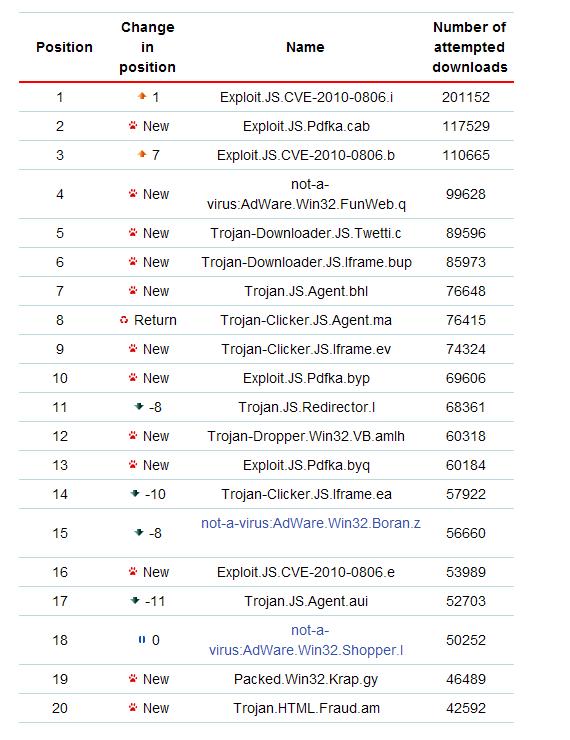
To top that, according to Kaspersky, Virus News, April 2010 Malware Statistics, 14 out of 20 exploits on the web all target JAVA! If you are using a computer that does not block Java, get a gun and shoot yourself in the foot, it makes as much sense.
Also you might want to seriously consider replacing Adobe reader with ‘FoxIt reader’. They have added the ability to block things from running inside of your PDF files. Like whom else but a virus writer would want to do that anyway?
To top that, according to Kaspersky, Virus News, April 2010 Malware Statistics, 14 out of 20 exploits on the web all target JAVA! If you are using a computer that does not block Java, get a gun and shoot yourself in the foot, it makes as much sense.
Also you might want to seriously consider replacing Adobe reader with ‘FoxIt reader’. They have added the ability to block things from running inside of your PDF files. Like whom else but a virus writer would want to do that anyway?
Friday, April 30, 2010
We need better weapons for the war on viruses!
We need a real breakthrough in the war on computer viruses. As I have said before that the anti-virus programs only catch about 1/2 of Virus's. Using two anti-virus programs may raise the detection level to 75%, but there is still a huge gap there. I am not talking about the problem where it takes a few hours from the time that the virus starts spreading to when the anti-virus programs are able to detect the virus. That in itself is a huge problem and the anti-virus programs are starting to combat that problem by also having a dictionary of allowed/safe programs. If one that is not listed tries to run it pops up and tells you about it and asks if you want to run the program. I am talking about actual long term infections. I have observed this for a few years now.
My first obvious case was a computer that was downloading porn on its own. When nothing could detect the problem I replaced the hard drive. When I copied their old desktop items to the new hard drive guess what? The porn download virus came with it. The anti-virus program did not detect a thing. Then there was the storm spam virus. I chased it to a computer and replaced the hard drive. The virus infected emails stopped but after 6 months none out of three anti-virus programs could detect the virus on the old hard drive. I offered to mail it to them if they wanted to analyze it. I got no response; I don't think they really care.
The only solution is still to replace the infected hard drive and be very careful as to what you copy off the old hard drive. Copy only their documents and pictures from the old drive. Anything else could be an undetectable virus.
What am I seeing these days? How about a computer that one day insists a file size is 0 bytes when it is really several KB? Or the next day it does not update the date of the file when you make changes to it? How about a computer that does all kinds of strange things on the network on strange ports all day long? In both cases 3 anti-virus programs find nothing at all! It is so frustrating!
We need a super weapon that can go the very core of the hard drive and analyze everything to see if it is a trusted program and flag it if it is not. Yes I know about ‘Hijack This’, I have an 11 page log on one of the problematic computers. It does not help. The virus writers know about HJT and I am sure they have a way around it.
I found a recent article that reflects some of my disappointments;
http://www.theregister.co.uk/2010/04/13/winxp_anti_malware_tests/
I wonder if part of the problem is what happened during the election several years ago. All of the news Medias reported the wrong results because they were all using the same incorrect sources. Where do the anti-virus people get their viruses to detect? Do they all use the same sources? Do they only use email viruses? Something is really amiss here with so many viruses going totally undetected.
Then there is also the instability problem (Kaspersky IS 2010 crashing/locking up computers - see my other posts). There is also their effectiveness in removing the viruses – for Instance AVG saying the ‘virus vault is full, no more room for viruses’. Sometimes it is just easier to replace the hard drive and start over. Then copy their files off the old hard drive.
Signed – One Very Frustrated Virus Fighter.
My first obvious case was a computer that was downloading porn on its own. When nothing could detect the problem I replaced the hard drive. When I copied their old desktop items to the new hard drive guess what? The porn download virus came with it. The anti-virus program did not detect a thing. Then there was the storm spam virus. I chased it to a computer and replaced the hard drive. The virus infected emails stopped but after 6 months none out of three anti-virus programs could detect the virus on the old hard drive. I offered to mail it to them if they wanted to analyze it. I got no response; I don't think they really care.
The only solution is still to replace the infected hard drive and be very careful as to what you copy off the old hard drive. Copy only their documents and pictures from the old drive. Anything else could be an undetectable virus.
What am I seeing these days? How about a computer that one day insists a file size is 0 bytes when it is really several KB? Or the next day it does not update the date of the file when you make changes to it? How about a computer that does all kinds of strange things on the network on strange ports all day long? In both cases 3 anti-virus programs find nothing at all! It is so frustrating!
We need a super weapon that can go the very core of the hard drive and analyze everything to see if it is a trusted program and flag it if it is not. Yes I know about ‘Hijack This’, I have an 11 page log on one of the problematic computers. It does not help. The virus writers know about HJT and I am sure they have a way around it.
I found a recent article that reflects some of my disappointments;
http://www.theregister.co.uk/2010/04/13/winxp_anti_malware_tests/
I wonder if part of the problem is what happened during the election several years ago. All of the news Medias reported the wrong results because they were all using the same incorrect sources. Where do the anti-virus people get their viruses to detect? Do they all use the same sources? Do they only use email viruses? Something is really amiss here with so many viruses going totally undetected.
Then there is also the instability problem (Kaspersky IS 2010 crashing/locking up computers - see my other posts). There is also their effectiveness in removing the viruses – for Instance AVG saying the ‘virus vault is full, no more room for viruses’. Sometimes it is just easier to replace the hard drive and start over. Then copy their files off the old hard drive.
Signed – One Very Frustrated Virus Fighter.
Friday, April 2, 2010
Fake Antivirus: Total XP Security
I had another round of fighting a fake antivirus called 'Total XP Security'. First I used Windows explorer to delete all the temporary files, then I deleted all of the temporary internet files but that did not help at all. Then I used Msconfig to disable all the startup options and then to disable everything, but it was all to no avail.
Next I tried goggling for ‘Total XP Security’. After reading some information on it I decided to use regedit to delete the following two keys:
‘HKEY_CURRENT_USER\Software\Classes\.exe’
‘HKEY_CURRENT_USER\Software\Classes\secfile’.
That worked! Then I downloaded and installed Malware Bytes Anti-Malware (MBAM) and told it to do a thorough scan. It found and fixed a number of registry entries that had disabled the firewall and disabled the real antivirus software that was running on that computer. I did this screen capture after I had deleted the entries.
Here is what got me about the latest incarnation of the fake antivirus, the real antivirus running on the computer did not prevent the fake antivirus from being installed, it did not detect the virus while it was running and the real antivirus appeared to be able to do a full system scan and find nothing wrong with the infected computer. How did they do that?
The first giveaway that it was an infection was that I could not install MBAM because the virus had disabled running any 'exe' files via the registry entry listed above that I then deleted. BTW the name of the actual virus file is ‘ave.exe’.
Next I tried goggling for ‘Total XP Security’. After reading some information on it I decided to use regedit to delete the following two keys:
‘HKEY_CURRENT_USER\Software\Classes\.exe’
‘HKEY_CURRENT_USER\Software\Classes\secfile’.
That worked! Then I downloaded and installed Malware Bytes Anti-Malware (MBAM) and told it to do a thorough scan. It found and fixed a number of registry entries that had disabled the firewall and disabled the real antivirus software that was running on that computer. I did this screen capture after I had deleted the entries.
Here is what got me about the latest incarnation of the fake antivirus, the real antivirus running on the computer did not prevent the fake antivirus from being installed, it did not detect the virus while it was running and the real antivirus appeared to be able to do a full system scan and find nothing wrong with the infected computer. How did they do that?
The first giveaway that it was an infection was that I could not install MBAM because the virus had disabled running any 'exe' files via the registry entry listed above that I then deleted. BTW the name of the actual virus file is ‘ave.exe’.
Subscribe to:
Posts (Atom)