Monday, November 30, 2015

Fix for adding Servos on the Arduino Analog Port/Pins of Servo/Sensor Shield

Over the weekend I found and fixed the design bug that prevents servos from working properly when they are connected to the analog port connectors of the standard servo/sensor shield.  The problem is that the logic five volts is always used to power those servos.  If there is any load on the servos they will overload and shut down the logic five volt voltage regulator.  The fix involves cutting two runs and adding two jumpers.  This change is needed to route the five volts around the servo connectors.
The problem showed up with my spider robot project.  Some servos tried to come to life without the six volt power supply being turned on.  It took a while to figure out where they were getting their power from.  The logic five volts was being pulled down to about two volts!

Also do not forget to remove the green jumper near the six volt power input screws.  It will also short the five volt logic power into powering the servos.  That could seriously damage the Arduino!

Another thing you might need to do to use more than 12 servos is to change a line in servo.h.  This limit gets mistaken as to why servos do not work on the analog pins.  There are usually 12 servos already on the digital pins and when you try to use the analog pins you have exceeded the 12 servo limit.  The line says something like "Maximum servos per timer = 12" and you will need to change it to 18 or even 20 if you want.  I have made the change months ago and it does not hurt anything to increase the maximum servos per timer.  Servo.h can be found in your Arduino/libraries/servo folder.

While working on my "Spider" smoke rolled off the Servo/Sensor shield.  This time a run had burned off the board!  I never had these problems with my home made servo shield!  Here is a picture of the burned run in the top left corner:
Here is the cure for the burnt run as well as a cure for the power distribution issues.  basically you take power from the screw terminal and distribute it to the top and middle of the 16 digital pin servo connectors as well as to the top of the 6 analog pin servo connectors.  With this change the spider worked perfectly.

While I am showing fried stuff, here is what happens when you buy a cheap servo on eBay:

Get real servos that say "Tower Pro" not "TowardPro".  Do not buy them if the seller intentionally hides the manufacturer name.  There are a lot of junk servos on eBay!

Another issue I just confirmed is that all HiTec servos work in the opposite direction of all other servos.  I now have five HiTec servos!  There are two options: Sell them or figure out how to reverse them internally.  I might do that and then post on how to reverse them.


Friday, November 20, 2015

Arduino Powered Hexapod/Spider 18 DOF Robot

My next project is a six legged robot.  I look at these projects that are all using an Arduino Uno and servos like they are a modern day version of the "erector set" that I played with as a kid.  This is a more economical way to build these various projects instead of buying several expensive kits.  Basically I am using the same parts to make all of the following projects:
5,9,13,17 DOF Humanoid robots
14 DOF Dog robot
17 DOF Dinosaur robot
18 DOF Spider robot

I have looked at several hexapod designs and so far I have been able to reproduce the body using standard parts.  The other designs use two custom plates spaced about two inches apart.  My design uses:
4 - Angled "U" brackets
2 - Straight "U" brackets
2 - Waist brackets
4 - Straight brackets
2 - "L" Shaped brackets.

Here is a top view of my design for the hexapod body.

This next picture is a side view of the hexapod body: 

So now to collect at least 18 servos to make it work.

I decided to make my own lower legs.  I used a picture from a kit on ebay and blew it up to the actual size.  Then I cut it out and used it as a model.  These legs were cut out with a hand held jig saw.  They did not look that good in clear plastic so I painted them black.

This is after two coats of paint.

This is what they look like on the assembled spider.  They are still a little rough.

 Here is how I assembled the servo mounting brackets.  Then I added the servos and then mounted them on the robot.

 The Arduino mounted real nicely using some of the existing holes in the bracket.

Here is the completed spider as far as the mechanical assembly.


Monday, November 9, 2015

Walking "Dog" and "Dinosaur" 17 DOF robot from Humanoid robot kit.

I plan on making some more creations besides the 9, 13, and 17 DOF humanoid robots from the robot kit.  The next one is this 14 DOF "Dog" robot.  This is actually the third revision and there will be more to come.  As you can see I have had a hard time with attaching the "tail".  The "Mouth" is a robot hand or it was....

He is starting to work.  Here is the latest picture of him.  He lost his "feet" and has a more solid rear end.
And now for his first video appearance.


The next thing to do is to add a tail and make him into a dinosaur.

Here is the dinosaur video.


He has now grown to three feet long and has LED eyes.

Here is his second video with greatly improved software.


Friday, October 9, 2015

Walking "Humanoid" Robot found on eBay part 3 with 9, 13, and 17 DOF

After not having a lot of success with a more complex robot I went backwards and built a 9 DOF humanoid robot.  Here is a picture of that robot.

Here is the video of him walking.


Up next is the 13 DOF humanoid robot.

Here is his video.


Here is his servo array to make him walk forward.

int walkf[6][6] = {
// 0    1    2    3    4    5
{ 80,  80,  80,  85,  90,  90}, // Left Ankle
{ 90,  80,  70,  70,  70,  80}, // Knee
{ 90,  80,  70,  70,  70,  80}, // Hip
{100, 100, 100,  95,  90,  85}, // Right Ankle
{ 90,  90,  80,  70,  70,  80}, // Knee
{ 90,  90,  80,  70,  70,  80}, // Hip
};

I still cannot get a 17 DOF robot to work very well.  My servos are too weak for the weight! Do not buy the MG995 or MG945 servos except for the arms (or for a 9-13 DOF robot). I have burned some up trying to power the 17DOF robots legs. I am thinking of trying the MG958. Anyone know if that servo has enough power?

Here is some more Information that I have discovered about servos and robots.

Be sure the servo that you buy is not a cheap imitation.  This can be detected by the seller hiding the manufacturer name or misspelling the manufacturer name.  A common example would be “Tower Pro” (real) or “Towerd Pro” (fake).

This is my new rule of thumb for making humanoid, as in 2 legged robots.  The problem is that the more the servos (and their connecting hardware) the more the robot weighs. 

The leg servos of a 5-9 DOF Humanoid robot should handle 100 oz. inches of torque. 
The leg servos of a 10-15 DOF Humanoid robot should handle 150 oz. inches of torque.
The leg servos of a 16-20 DOF Humanoid robot should handle 200 oz. inches of torque.
Here is the video of the 17 DOF humanoid robot.


Wednesday, September 16, 2015

Walking "Humanoid" Robot found on eBay part 2

I am back to working on the walking humanoid robot after writing another book.  First I had to make an Arduino Shield to control the servo's.  Here is a video testing the servo shield.


Next is to connect it to the robot and get those servo's working.  I am using an IR remote control to test his movements.  This is a picture of the front view of the setup.

Here is the back view.  The arduino has been mounted in place for this picture.


Here is a video of me testing out the robot servo's.


Here is a second video with most of the servo's working and they are now "zeroed".


In spite of the really bad servo's he is taking his first steps.


Here is a two servo per leg version of the robot.


Here is the code for the two servo per leg robot in video 4.

void StepForward(){  //Moving Left Leg Forward
  servo1.write(75);  //shift weight to left ankle
  servo3.write(60);  //right ankle kicks weight over
  delay(200);
  servo3.write(70);  //free ankle lifts
  servo2.write(110); //left hip
  servo4.write(120); //right hip
  delay(200);
  servo1.write(90);  //level leftt ankle
  servo3.write(90);  //level right ankle
  delay(200);
  servo1.write(115);  //Shift weight to right ankle
  servo3.write(110); 
  delay(200);
  servo1.write(110);  //free ankle lifts
  servo2.write(70);  //left hip
  servo4.write(60);  //right hip
  delay(200);
  servo1.write(90);  //left ankle - back to home positions
  servo2.write(90);  //left hip
  servo3.write(90);  //right ankle
  servo4.write(90);  //right hip
  delay(200); 
}

Friday, August 28, 2015

DIY Arduino Uno powered 5 MSPS Oscilloscope.

I have been wrining a book of "Arduino Oscilloscope Projects".  In this book I show 4 different LCD's, 5 different Analog to digital converters, and 3 different analog front ends.  The code has greatly improved with a "gain" in software feature.  I have written the code for a 1.8 SPI TFT screen as well as for a 2.4 inch or 2.8 inch ILI9341 Screen.

Here is what the 1.8 inch screen looks like.  On the bigger screens the sample time in MS is located under the other text fields on the right side.

Here is what the assembled oscilloscope looks like so far.

This is a picture of the main board without the LCD screen.

This is the front cover.  I need to wire the cover to the main board next.

Here is the finished project.

Here is a video of the project.

Thursday, August 20, 2015

Chestnut Ridge Park - The Eternal Flame

A few days ago we walked to the Eternal Flame at Chestnut Ridge Park.  Here are some pictures.
This is a chipmunk that watches us on our walk.

When you get down to the creek bed this is what it looks like.  You need to climb over some logs.

This is looking back up the side of the creek bed. 

 There are lots of warning signs....

Finally we made it to the eternal flame.


Monday, July 27, 2015

2.2 or 2.4 or 2.8 inch SPI TFT LCD ILI9341 to Arduino Uno

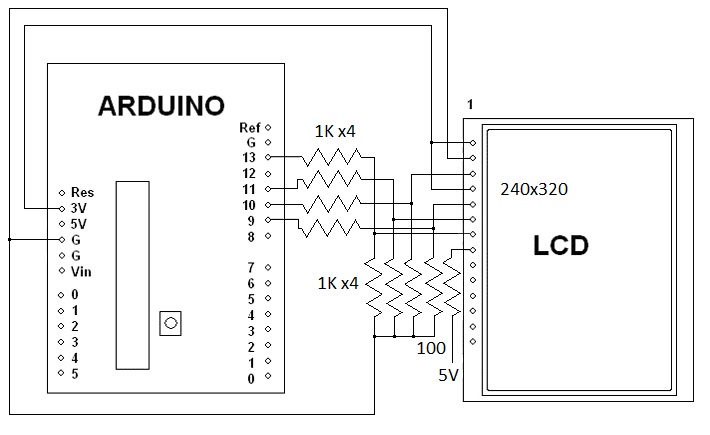
Over the weekend I figured out how to interface a 2.8 inch SPI TFT that has a ILI9341 chip to an Arduino Uno.  All it takes is eight 1K resistors.  Most people use a 4050 IC.  Here is the schematic.

I am using the Adafruit ILI9341 driver found at: https://github.com/adafruit/Adafruit_ILI9341
Note that the Adafruit LCD has level shifters for 5 volts built into it.

Here is a video of it working on Youtube.

Here is a video of the LCD being used as an oscilloscope.


Here are a couple of still pictures, only 6 of the 8 bits are connected for these pictures.


Here is the code for a more basic oscilloscope.

/************************************
 2.8 SPI PIND TFT Oscope Simple
 Reads the D0-D7 pins using PIND,
 and shows the value on the screen.
 Created 27 july 2015 by Bob Davis
**************************************/
//#include  // Arduino LCD library
#include
#include "Adafruit_ILI9341.h"
#include "Adafruit_GFX.h"

// pin definition for the Uno LCD
#define TFT_DC 9
#define TFT_CS 10
// Use hardware SPI (on Uno, #13=clk, #11=mosi) and the above for CS/DC
//Adafruit_ILI9341 tft = Adafruit_ILI9341(TFT_CS, TFT_DC);
Adafruit_ILI9341 tft = Adafruit_ILI9341();

//// set up variables
int Input=0;
byte Sample[320];
int trigger=64;

void setup(){
  // initialize rotate and clear the display
  tft.begin();
  tft.fillScreen(ILI9341_BLACK);
  tft.setRotation(1);
  // Set the font size
  tft.setTextSize(2);
  // D input pins
  pinMode(0, INPUT);
  pinMode(1, INPUT);
  pinMode(2, INPUT);
  pinMode(3, INPUT);
  pinMode(4, INPUT);
  pinMode(5, INPUT);
  pinMode(6, INPUT);
  pinMode(7, INPUT);
}

void loop(){
  // wait for a positive going trigger
  for (int timeout=0; timeout < 1000; timeout++){
    Input = PIND;
    if (Input < trigger) break;  }
  for (int timeout=0; timeout < 1000; timeout++){
    Input = PIND;
    if (Input > trigger) break;  }
  // quickly collect the data with no delay
  for (int xpos=0; xpos <320; xpos++){
  Sample[xpos]=PIND;
  // display the collected data
  for (int xpos=0; xpos <319; xpos++){
  // erase the old and draw new line
    tft.drawLine(xpos+1, 0, xpos+1, 240, ILI9341_BLACK);
    tft.drawLine(xpos, (Sample[xpos]*2), xpos+1, Sample[xpos+1]*2, ILI9341_WHITE);
  }
}
// End of program

There is more info on the analog to digital converter at http://bobdavis321.blogspot.com/2015/06/arduino-5msps-oscilloscope-revisited.html

Sunday, July 19, 2015

2015 Batavia NY Hamfest

This year I made it back to the Batavia NY Hamfest!   It was bigger than most of the Hamfests that I make it to.  The picture only shows one of two isles of equipment for sale.  I forgot my camera and it was dark so my cell phone pictures are not that great, sorry about that.

Here is my stuff for sale.  The car does not fit as much stuff as the van did.

Thursday, July 16, 2015

Walking "Humanoid" Robot found on eBay.

My book "Arduino Robotics Projects" ended with a walking dinosaur.  I might eventually write a sequel to that book with a spider and a humanoid robot.  One of those projects that I have been working on is a walking "Humanoid" robot.  Recently I completed building the legs.

Here are some of the many parts that comes with the robot found on ebay.

Here is the actual parts list:
- 16 x Multi-functional servo bracket
- 7 x Short U-type servo bracket
- 4 x Long U-type servo bracket
- 4 x Angled U-type servo bracket
- 4 x Flat servo bracket
- 4 x L-type servo bracket
- 1 x U-type robot waist bracket (not pictured, I made my own)
- 2 x Foot Base
- 14 x Miniature Ball Radial Bearing
- 17 x Metal Servo Horn Flange
- 1  x Screw and nut set

You will also need flanges, bearings and lots of screws.  Do not use the pictured 16 channel servo controller you will need a 32 channel servo controller.

You will also need about 17 servo motors!  Here is a few of them, they are MG995's.

Here is how to assemble the feet.  Use the flat head M4 screws as seen on the right side.


There are two ways to mount the bearing as seen on the left in the above picture.  You can put the screw in first and then bend the "U" metal bracket over the screw and bearing.  The other way is to use tweezers to hold the nut in place and then put the screw in as seen above.

When I started I used the wrong screws to hold the servo's in place.  You are supposed to use the M4 screws (A little bigger than a 6-32 screw) but I used the M3 screws (about the size of a 4-40 screw) instead.  I am in the process of changing all of the servo mounting screws.  Also my guess is that the four screws used to hold the servo flange to the "U" bracket are supposed to be flat head screws.  The rounded or pan head screws are for the center of the flange to fasten it to the servo.

I am making my own breast plate that looks better than one made out of small parts.  It is made out of a left over 4 inch piece of 3 inch "C" channel removed from a 19 inch rack.

Here is the completed and painted chest piece.

I have assembled the robot with the home made chest.  I used 1/2 inch spacers to move the shoulder servo's out to where the head mounting bracket fits between them.  Note that I only used 4 servo's per leg, I think that is all that is needed.


Thursday, July 2, 2015

Arduino 50 MSPS DSO Oscilloscope with TDA8703

Last night I was testing a TDA8703 analog to digital converter and after trying 36 MHz I tried 50 MHz on a whim and it worked.  I also tried 60 MHz but the TDA8703 flaked off at that speed.

Here is a picture of the test setup.

This is what the LCD screen looks like.

Here is the video of it at 50 MSPS and 25MSPS.


Here is the schematic diagram.