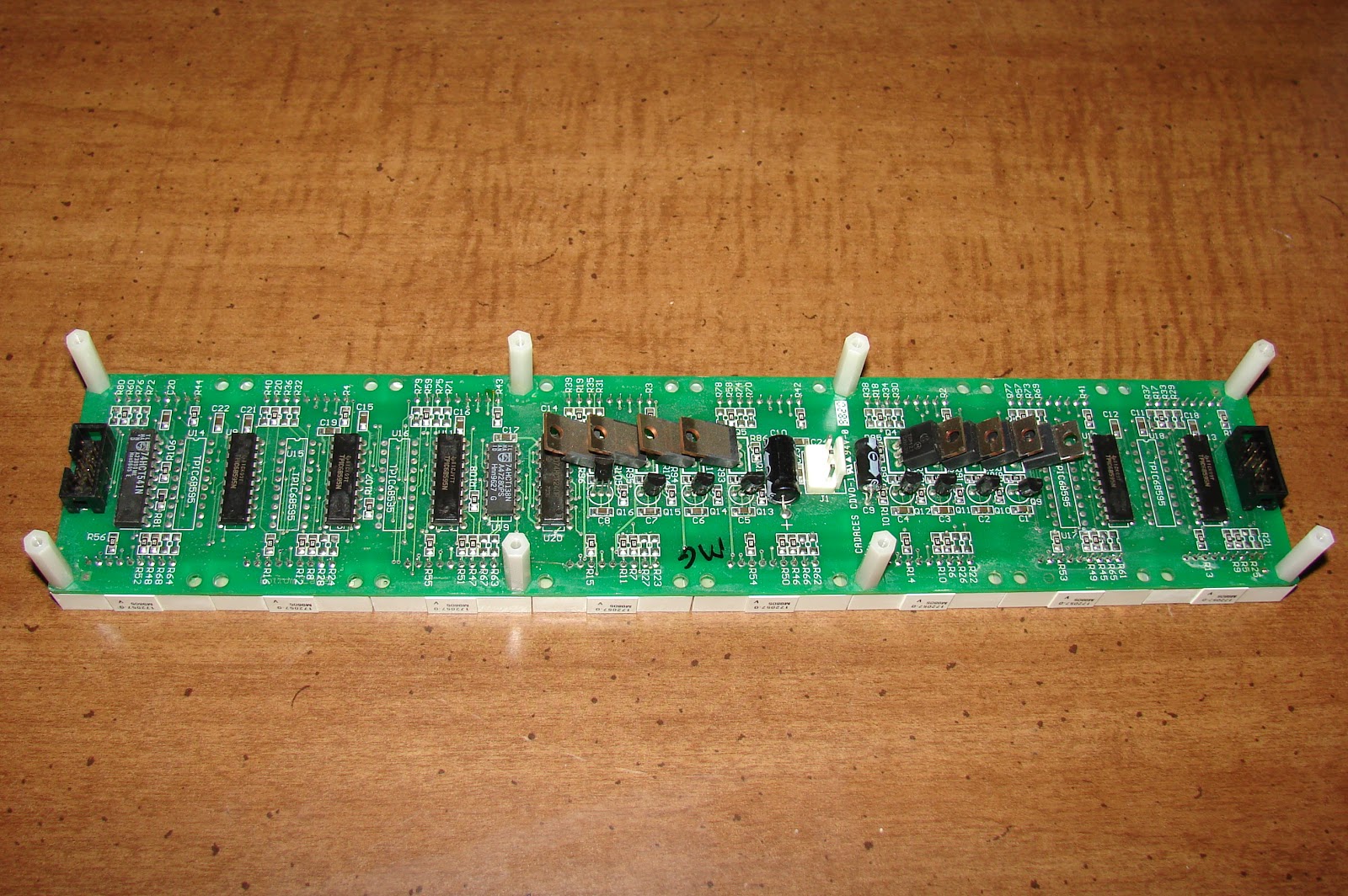
I have removed three of the Cadaces modules and have written some new code to make them work. Next is to hard wire the interface circuitry instead of using jumper wires.
Once the controller is wired up and the sign is put back together here is what it looks like. The picture does not tell the whole story, the display blinks, and the more lines that are enabled the more it blinks. I will have to work on improving the software to fix that problem.
Here is the new Arduino controller on the left compared to the old sign controller on the right:
Here is the Arduino Controller installed into the Signature Electronic Sign. I goofed a little bit in the layout so that the ribbon cables must be flipped around backwards so that the stripe is to the right.
Here is the schematic diagram. I wired it with point to point wiring, however a circuit board or wire wrap would have been easier to do.
Last of all here is the code for the sign. It was written without scrolling and set up for up to four lines of text. It still needs some work, like the ability to convert a line of text into an array of characters automatically. I did that manually.
//****************************************************//
// Name : Cadaces Driver //
// Author : Bob Davis //
// Date : 4 January, 2013 //
// Version : 1.0 //
//****************************************************//
// Pins for the row drivers
int row1Pin = 1;
int row2Pin = 2;
int row3Pin = 3;
int rowEnable = 4;
// Pins for column shift registers
int rclockPin = 5;
int clockPin = 6;
int dataPin = 7;
int clockPin1 = 8;
int dataPin1 = 9;
int clockPin2 = 10;
int dataPin2 = 11;
int clockPin3 = 12;
int dataPin3 = 13;
// Set the pins to output to the sign
void setup() {
pinMode(row1Pin, OUTPUT);
pinMode(row2Pin, OUTPUT);
pinMode(row3Pin, OUTPUT);
pinMode(rowEnable, OUTPUT);
pinMode(rclockPin, OUTPUT);
pinMode(clockPin, OUTPUT);
pinMode(dataPin, OUTPUT);
pinMode(clockPin1, OUTPUT);
pinMode(dataPin1, OUTPUT);
pinMode(clockPin2, OUTPUT);
pinMode(dataPin2, OUTPUT);
pinMode(clockPin3, OUTPUT);
pinMode(dataPin3, OUTPUT);
}
//=== Character Array ===
// Characters are A, B, C, etc. Only upper case, no symbols.
byte alphabets[][8] = {
{0, 04, 10, 17, 17, 31, 17, 17}, //A
{0, 30, 17, 17, 30, 17, 17, 30}, //B
{0, 14, 17, 16, 16, 16, 17, 14}, //C
{0, 28, 18, 17, 17, 17, 18, 28}, //D
{0, 31, 16, 16, 31, 16, 16, 31}, //E
{0, 31, 16, 16, 31, 16, 16, 16}, //F
{0, 14, 17, 16, 16, 19, 17, 14}, //G
{0, 17, 17, 17, 31, 17, 17, 17}, //H
{0, 14, 04, 04, 04, 04, 04, 14}, //I
{0, 07, 02, 02, 02, 02, 10, 14}, //J
{0, 17, 18, 20, 24, 20, 18, 17}, //K
{0, 16, 16, 16, 16, 16, 16, 31}, //L
{0, 10, 21, 21, 21, 17, 17, 17}, //M
{0, 17, 25, 25, 21, 19, 19, 17}, //N
{0, 14, 17, 17, 17, 17, 17, 14}, //O
{0, 30, 17, 17, 30, 16, 16, 16}, //P
{0, 14, 17, 17, 17, 17, 19, 15}, //Q
{0, 30, 17, 17, 30, 20, 18, 17}, //R
{0, 14, 17, 16, 14, 01, 17, 14}, //S
{0, 31, 04, 04, 04, 04, 04, 04}, //T
{0, 17, 17, 17, 17, 17, 17, 14}, //U
{0, 17, 17, 17, 10, 10, 10, 04}, //V
{0, 17, 17, 17, 21, 21, 21, 10}, //W
{0, 17, 17, 10, 04, 10, 17, 17}, //X
{0, 17, 10, 10, 04, 04, 04, 04}, //Y
{0, 31, 8, 04, 02, 04, 8, 31}, //Z
};
byte bitmap[][8] = {
{0, 30, 17, 17, 30, 17, 17, 30}, //B
{0, 14, 04, 04, 04, 04, 04, 14}, //I
{0, 14, 17, 16, 16, 19, 17, 14}, //G
{0, 0,0,0,0,0,0,0},
{0, 4, 10, 17, 17, 31, 17, 17}, //A
{0, 30, 17, 17, 30, 20, 18, 17}, //R
{0, 28, 18, 17, 17, 17, 18, 28}, //D
{0, 17, 17, 17, 17, 17, 17, 14}, //U
{0, 14, 04, 04, 04, 04, 04, 14}, //I
{0, 17, 25, 25, 21, 19, 19, 17}, //N
{0, 14, 17, 17, 17, 17, 17, 14}, //O
{0, 0,0,0,0,0,0,0},
{0, 14, 17, 16, 14, 01, 17, 14}, //S
{0, 14, 04, 04, 04, 04, 04, 14}, //I
{0, 14, 17, 16, 16, 19, 17, 14}, //G
{0, 17, 25, 25, 21, 19, 19, 17}, //N
{0, 0,0,0,0,0,0,0},
};
void RunSign()
{
for (int row = 7; row > 0; row--)
{
// turn off display
digitalWrite(rowEnable, HIGH);
// send serial data to display 15 = number of led arrays
for (int character = 0; character < 16; character++)
{
shiftOut(dataPin, clockPin, MSBFIRST, bitmap[character][row]);
// shiftOut(dataPin1, clockPin1, MSBFIRST, bitmap[character][row]);
// shiftOut(dataPin2, clockPin2, MSBFIRST, bitmap[character][row]);
shiftOut(dataPin3, clockPin3, MSBFIRST, bitmap[character][row]);
}
//latch the data
digitalWrite(rclockPin, LOW); digitalWrite(rclockPin, HIGH);
// set up 74138 row sesection and turn display back on
digitalWrite(row1Pin, LOW);
digitalWrite(row2Pin, LOW);
digitalWrite(row3Pin, LOW);
if (row==1 or row==3 or row==5 or row==7) digitalWrite (row1Pin, HIGH);
if (row==2 or row==3 or row==6 or row==7) digitalWrite (row2Pin, HIGH);
if (row >= 4) digitalWrite (row3Pin, HIGH);
digitalWrite(rowEnable, LOW);
// Wait to see what we sent to the display ;
delayMicroseconds(500);
}
}
//=== L O O P ===
void loop() {
RunSign();
}
Monday, January 7, 2013
Saturday, December 29, 2012
Signature Electronic Signs Inc repair
This post is continued here: http://www.bobdavis321.blogspot.com/2013/01/signature-electronic-signs-convert-to.html
There are several Signature Electronic LED Signs for sale on EBay. I bought one that did not work and to get it working I had to add a power cord, and connect the 5 volt power to the processor board in the upper left corner.
Here is the right side of the back where the 110 Volt power is connected.
These signs are made with Cadaces CDVO-1 boards strung together. Each of those boards holds 8 of 8 by 5 LED arrays. TPIC68595 serial shift registers drive the columns and a 74HCT138 drives the rows via some TIP127's. There are 12 of these Cadaces CDVO-1 boards in the sign.
The controller card has two wires that connect it to the outside world. One is green one is blue. I have traced them out to a "485" IC. That IC is a RS422 communications chip, so likely the sign is communicated with via RS422. You will need a Serial or USB to RS422 adapter to talk to the sign.
Here is what one of the Cadaces CDVO-1 boards looks like.
Here is the back side of the Cadaces CDVO-1 board. I have metered out the pinout and hope to post that soon. Then I can work on interfacing it to an Arduino or something like that.
Here is how the Cadaces board connects to the controller.
Here is a size comparison between the new sign and the old Silent radio sign
The new sign is now working with the Arduino processor, but there is a bug when trying to run the entire sign. Each sequential board displays the same thing as the previous board, it is just scrolled down one position.
I am using the same software as with the Silent Radio sign, but with the register clock jumpered to the serial data clock, and the column selection code has been modified to work with the 74138.
There are several Signature Electronic LED Signs for sale on EBay. I bought one that did not work and to get it working I had to add a power cord, and connect the 5 volt power to the processor board in the upper left corner.
Here is the right side of the back where the 110 Volt power is connected.
The controller card has two wires that connect it to the outside world. One is green one is blue. I have traced them out to a "485" IC. That IC is a RS422 communications chip, so likely the sign is communicated with via RS422. You will need a Serial or USB to RS422 adapter to talk to the sign.
Here is what one of the Cadaces CDVO-1 boards looks like.
Here is the back side of the Cadaces CDVO-1 board. I have metered out the pinout and hope to post that soon. Then I can work on interfacing it to an Arduino or something like that.
Here is how the Cadaces board connects to the controller.
Here is a size comparison between the new sign and the old Silent radio sign
The new sign is now working with the Arduino processor, but there is a bug when trying to run the entire sign. Each sequential board displays the same thing as the previous board, it is just scrolled down one position.
I am using the same software as with the Silent Radio sign, but with the register clock jumpered to the serial data clock, and the column selection code has been modified to work with the 74138.
Sunday, December 16, 2012
Poloroid TDA-03211 3211 32 LCD TV Repair Part 2
I recently had to re-repair the Poloroid TDA-03211 3211 32 LCD TV. This time one of the tiny blue capacitors in the red circled area had shorted and turned black.
I could not read what was written on those caps so I removed them and tested them. The two good ones were about 1 pf, or at the range limit of my capacitor meter. They appeared to be 3 KV caps. So I replace the fried one with a 1 pf 3Kv capacitor and the TV still did not work.
The problem was that I had soldered one capacitor in wrong. Two of them are part of the protection circuit that detects any problems and shuts down the High Voltage. They have to be replaced properly or the set will shut off after about 5 seconds.
Here is a better picture of the power supply:
I circled the blue caps, the tan one is my replacement capacitor. Notice the large red caps, they are 2.2 uF at 400 volt paper caps that replaced the old 4 uF electrolytic caps.
I could not read what was written on those caps so I removed them and tested them. The two good ones were about 1 pf, or at the range limit of my capacitor meter. They appeared to be 3 KV caps. So I replace the fried one with a 1 pf 3Kv capacitor and the TV still did not work.
The problem was that I had soldered one capacitor in wrong. Two of them are part of the protection circuit that detects any problems and shuts down the High Voltage. They have to be replaced properly or the set will shut off after about 5 seconds.
Here is a better picture of the power supply:
I circled the blue caps, the tan one is my replacement capacitor. Notice the large red caps, they are 2.2 uF at 400 volt paper caps that replaced the old 4 uF electrolytic caps.
Friday, December 14, 2012
Dunlap Clarke Rebuild part 2
A while back I started rebuilding a Dunlap Clarke Amplifier. This is an update to the rebuild project. I stripped the cabinet almost completely bare, then cut holes in the sided for new heat sinks. Next I drilled holes for the power transformer.
Next I installed the heat sinks with the new circuit board and wired everything up. The new power transformer is 50 volt center tapped at 8 amps.
So far all I have done is a hum test. I connected speakers and tapped the input screws to produce a loud hum. Next is to wire up the input jacks and level controls.
Next I installed the heat sinks with the new circuit board and wired everything up. The new power transformer is 50 volt center tapped at 8 amps.
So far all I have done is a hum test. I connected speakers and tapped the input screws to produce a loud hum. Next is to wire up the input jacks and level controls.
Saturday, November 17, 2012
Popout Vertical Menu for WordPress website using HTML and CSS
I designed a popout vertical menu for wordpress for a previous employer but they never liked it or used it. So here it is for everyone to use! It only uses CSS and HTML so it can be used anywhere!
To see it in action, select all of the code, cut and paste it into notepad. Save it as "vertmenu.html" then find the file that you just saved and double click on it.
Here is a picture of it in action:
To see it in action, select all of the code, cut and paste it into notepad. Save it as "vertmenu.html" then find the file that you just saved and double click on it.
Here is a picture of it in action:
<style type="text/css"> #navigation {width: 180px; font-size: 1em; Font-family: arial;} #navigation ul { margin: 0px; padding: 0px; } ul.top-level { background: #CCf; } #navigation li { list-style: none; } ul.top-level li { border-bottom: #fff solid; border-top: #fff solid; border-width: 1px; } #navigation a { color: #000; cursor: pointer; display:block; height:25px; line-height: 25px; text-indent: 10px; text-decoration:none; width:100%; } #navigation a:hover{ text-decoration:underline; } #navigation li:hover {background: #DDF; position:top; } ul.sub-level { display:none; width:600px; height:220px; } li:hover .sub-level { background: #EEF; border: #fff solid; border-width: 1px; display: block; position: absolute; left: 180px; top: 5px; } ul.sub-level li { border: none; float:left; width:180px; } #navigation .sub-level { background: #EEF; } /*IE RESET HELPER*/ li:hover .sub-level .sub-level { display:none; } .sub-level li:hover .sub-level { display:block; } </style> <div id="navigation"> <ul class="top-level"> <li> <a href="http://www.gentech.com/about-gentech/" title="About us">About us</a> <ul class="sub-level"> <li> <a href="http://www.gentech.com/gentech-contact-information/" title="How to Contact GenTech ">Contact us</a> </li> <li> <a href="http://www.gentech.com/gentech-catalog/" title="GenTech Catalog">Our Catalog</a> </li> <li> <a href="http://www.gentech.com/gentech-employment/" title="GenTech Employment"> Employment Openings</a> </li> <li> <a href="http://www.gentech.com/gentech-financing/" title="GenTech Financing">Our Financing</a> </li> <li> <a href="http://www.gentech.com/guide-to-mass-specs/" title="Compare Mass Spectrometer Features">Guide to MS</a> </li> <li> <a href="http://www.gentech.com/gentech-history/" title="GenTech History">Our History</a> </li> <li class="cat-item cat-item-14"> <a href="http://www.gentech.com/gentech-terms/" title="GenTech Term and Conditions">Our Terms</a> </li> <li> <a href="http://www.gentech.com/gentech-testimonials/" title="GenTech Testimonials">Customer Testimonials</a> </li> <li> <a href="http://www.gentech.com/gentech-warranty/" title="GenTech Warranty">Our Warranty</a> </li> <li> <a href="http://www.gentech.com/10-reasons-to-choose-gentech/" title="10 Reasons to Choose GenTech">Why Choose GenTech</a> </li> <li> <a href="http://www.gentech.com/useful-links/" title="Useful Analytical Equipment Links">Useful Links</a> </li> </ul> </li> <li> <a href="http://www.gentech.com/gc/" title="Used Gas Chromatography Equipment"> GC </a> <ul class="sub-level"> <li><a href="http://www.gentech.com/category/gc/agilenthp-gc/" title="Used Agilent/HP Gas Chromatography">Agilent/HP GC</a> </li> <li> <a href="http://www.gentech.com/category/gc/perkin-elmer-gc/" title="Used Perkin Elmer Gas Chromatography">Perkin Elmer GC</a> </li> <li><a href="http://www.gentech.com/category/gc/shimadzu-gc/" title="Used Shimadzu Gas Chromatography">Shimadzu GC</a> </li> <li><a href="http://www.gentech.com/category/gc/other-gc/" title="Other Gas Chromatography Instruments">Other GC</a> </li> <li><a href="http://www.gentech.com/category/gc/gc-accessories/" title="Gas Chromatography Instrument Accessories">GC Accessories</a> </li> <li><a href="http://www.gentech.com/category/gc/gc-kits/" title="Gas Chromatography Installation Kits">GC Kits</a> </li> <li><a href="http://www.gentech.com/category/gc/gc-software/" title="Gas Chromatography Software">GC Software</a> </li> </ul> </li> <li><a href="http://www.gentech.com/hplc/" title="Used HPLC Equipment">HPLC</a> <ul class="sub-level"> <li><a href="http://www.gentech.com/category/hplc/new-hplc-systems/" title="New HPLC Systems">New HPLC Systems</a> </li> <li><a href="http://www.gentech.com/category/hplc/agilenthp-hplc/" title="Used Agilent/HP HPLC Instruments">Agilent/HP HPLC</a> </li> <li><a href="http://www.gentech.com/category/hplc/perkin-elmer-hplc/" title="Used Perkin Elmer HPLC Instruments">Perkin Elmer HPLC</a> </li> <li><a href="http://www.gentech.com/category/hplc/shimadzu-hplc/" title="Used Shimadzu HPLC Instruments">Shimadzu HPLC</a> </li> <li><a href="http://www.gentech.com/category/hplc/waters-hplc/" title="Used Waters HPLC Instruments">Waters HPLC</a> </li> <li><a href="http://www.gentech.com/category/hplc/other-hplc/" title="Other HPLC Instruments">Other HPLC </a> </li> <li><a href="http://www.gentech.com/category/hplc/hplc-kits/" title="HPLC Instruments Installation Kits">HPLC Kits</a> </li> <li><a href="http://www.gentech.com/category/hplc/hplc-software/" title="HPLC Instrument Software">HPLC Software</a> </li> </ul> </li> <li><a href="http://www.gentech.com/mass-spec/" title="Used Mass Spectrometer Equipment">Mass Spectrometer</a> <ul class="sub-level"> <li><a href="http://www.gentech.com/category/mass-spec/gcms-systems/" title="Used GC/MS Instruments">GC/MS Systems</a> </li> <li><a href="http://www.gentech.com/category/mass-spec/lcms-systems/" title="Used LC/MS Instruments">LC/MS Systems</a> </li> <li><a href="http://www.gentech.com/category/mass-spec/mass-spec-kits/" title="Mass Spec Instruments Installation Kits">Mass Spec Kits</a> </li> <li><a href="http://www.gentech.com/category/mass-spec/ms-accessories/" title="Mass Spec Instruments Accessories">MS Accessories</a> </li> </ul> </li> <li><a href="http://www.gentech.com/aaicp/" title="Used AA/ICP Equipment">AA/ICP</a> <ul class="sub-level"> <li><a href="http://www.gentech.com/category/aa-icp/atomic-absorption/" title="Used AA Instruments">Atomic Absorption</a> </li> <li><a href="http://www.gentech.com/category/aa-icp/icp/" title="Used ICP Instruments">ICP Instruments</a> </li> </ul> </li> <li><a href="http://www.gentech.com/miscellaneous/" title="Misc Analytical Instruments">Misc.</a> <ul class="sub-level"> <li><a href="http://www.gentech.com/category/misc/edwards-pumps/" title="New and Used Edwards Pumps">Edwards Pumps</a> </li> <li><a href="http://www.gentech.com/category/misc/other-instruments/" title="Other Used Instruments">Other Instruments</a> </li> <li><a href="http://www.gentech.com/category/misc/pfeiffer-pumps/" title="Used Pfeiffer Pumps">Pfeiffer Pumps</a> </li> <li><a href="http://www.gentech.com/category/misc/varian-pumps/" title="New Varian Pumps">Varian Pumps</a> </li> </ul> </li> <li><a href="http://www.gentech.com/parts-department/" title="Analytical Instrument Parts">Parts Department</a> <ul class="sub-level"> <li><a href="http://www.gentech.com/category/parts-dept/finnigan-parts/" title="Thermo Finnigan Instrument Parts">Thermo Finnigan Parts</a> </li> <li><a href="http://www.gentech.com/category/parts-dept/hp-parts/" title="HP Instrument Parts">HP Instrument Parts</a> </li> <li> <a href="http://www.gentech.com/category/parts-dept/hp-parts/1100/" title="HP 1100 HPLC Instrument Parts">&HP 1100 HPLC Parts</a> </li> <li> <a href="http://www.gentech.com/category/parts-dept/hp-parts/5890/" title="HP 5890 GC Instrument Parts">&HP 5890 GC Parts</a> </li> <li> <a href="http://www.gentech.com/category/parts-dept/hp-parts/59715972/" title="HP 5972 MS Instrument Parts">&HP 5970-72 MS Parts</a> </li> <li> <a href="http://www.gentech.com/category/parts-dept/hp-parts/5973/" title="HP 5973 MS Instrument Parts">&HP 5973 MS Parts</a> </li> <li> <a href="http://www.gentech.com/category/parts-dept/hp-parts/6890/" title="HP 6890 GC Instrument Parts">&HP 6890 GC Parts</a> </li> <li> <a href="http://www.gentech.com/category/parts-dept/hp-parts/7673/" title="HP 7673 Autosampler Parts">&HP 7673 AS Parts</a> </li> <li><a href="http://www.gentech.com/category/parts-dept/other-parts/" title="Other Scientific Instrument Parts">Other Instrument </a> </li> <li><a href="http://www.gentech.com/category/parts-dept/perkin-elmer-parts/" title="Perkin Elmer Instrument Parts">Perkin Elmer </a> </li> <li><a href="http://www.gentech.com/category/parts-dept/pfeiffer-parts/" title="Pfeiffer Instrument Parts">Pfeiffer Parts</a> </li> <li><a href="http://www.gentech.com/category/parts-dept/tekmar-parts/" title="Tekmar Instrument Parts">Tekmar Instrument Parts</a> </li> <li><a href="http://www.gentech.com/category/parts-dept/varian-parts/" title="Varian Instrument Parts">Varian Instrument Parts</a> </li> </ul> </li> <li><a href="http://www.gentech.com/services-overview/" title="Analytical Instrument Services">Services</a> <ul class="sub-level"> <li><a href="http://www.gentech.com/bench-repair/" title="Analytical Instrument Repair">Bench Repair</a> </li> <li><a href="http://www.gentech.com/installation/" title="Analytical Instrument Installation">Instrument Installation</a> </li> <li><a href="http://www.gentech.com/packing-instructions/" title="Instrument Packing Instructions">Packing Instructions</a> </li> <li><a href="http://www.gentech.com/request-service-form/" title="Request Instrument Service Form">Request Service Form</a> </li> <li><a href="http://www.gentech.com/service/" title="Instrument Service Information">Service Information</a> </li> <li><a href="http://www.gentech.com/shipping/" title="Analytical Instrument Shipping">Instrument Shipping</a> </li> <li><a href="http://www.gentech.com/circuit-board-repair" title="Analytical Circuit Board Repair">Circuit Board Repair</a> </li> </ul> </li> </ul> </div>
Thursday, November 8, 2012
New floor for a friend
Recently I installed a new floor for a friend. It is the interlocking wood floor like what I did in my living room. These came with a water seal and pad built in so installation was easier. Here are some pictures of the resulting floor.
Samsung 42 inch Plasma TV Repair Model P4231
I picked up a 42 inch plasma TV for free a few months ago. The owner was getting rid of it because it shuts off after a few hours. It eventually got so bad that it acted up after just one hour. So it was time to take it apart and fix it. Here it is with the covers removed. You have to remove the base to remove the back cover.
Here is the power supply board. You will need to remove it for servicing. First check for any blown capacitors. Then turn it over and re-solder any connections that go to anything mounted on the heat sink or that looks at all worn.
If all else fails add a cooling fan. Mine has now been running over 4 hours after re-soldering the connections.
Monday, October 29, 2012
Compaq F700 repair
Recently I had the job of fixing a Compaq F700 that overheated and shut off after about 15 minutes of operation. Needless to say the cooling fan was completely clogged with dust as can be seen in the picture below.
To get inside of this computer you need to find some hidden screws. First you remove the panel above the keyboard, then the keyboard then the CD ROM drive. There are three screws hidden above the CD ROM front edge. Then there are three screws you must remove from the bottom, two are standoffs and one is above the hard drive. I circled their locations in the picture below.
There is another screw that can only be reached from above, once the CD ROM is removed. There is a hole now available that goes down through where the CD drive had been to access a hidden screw down below. You have to remove the screen and all the usual screws to finally get the top cover off the laptop. Once you remove the main board the cooling fan screws are hidden under some black sticky plastic. They are extra small and hard to remove.
To get inside of this computer you need to find some hidden screws. First you remove the panel above the keyboard, then the keyboard then the CD ROM drive. There are three screws hidden above the CD ROM front edge. Then there are three screws you must remove from the bottom, two are standoffs and one is above the hard drive. I circled their locations in the picture below.
There is another screw that can only be reached from above, once the CD ROM is removed. There is a hole now available that goes down through where the CD drive had been to access a hidden screw down below. You have to remove the screen and all the usual screws to finally get the top cover off the laptop. Once you remove the main board the cooling fan screws are hidden under some black sticky plastic. They are extra small and hard to remove.
Hurricane Sandy
As Hurricane Sandy approaches our coast I am compelled to think back over the last few years. Somewhere on this blog I talked about how when Florida was promoting the gay lifestyle for two years in a row three hurricanes per year crossed through Florida, some hurricanes crossed more than once! Then there was California voting in gay marriage and in one night 800 dry lightning strikes started almost 1000 forest fires. Then last year New York adopted gay marriage and three hurricanes/tropical storms hit New York state in one year!
One tropical storm hitting in 20 years is more the normal for New York state. Maybe only one in every 10 years, but last year 3 tropical storms hit NY in one year! Is that supposed to be a coincidence? Now we are bracing for tropical storm "Sandy".
This storm is just the beginning of the end. I have seen visions of smoke rising out of many cities. I have heard "this will happen here" when I see the unrest in the middle east. I have had dreams where the government forces are attacking innocent civilians in the cities just like what has been going on in Syria and other countries. This upcoming election is a loose-loose situation. Either way we loose. If one side does not win they claim they will start a second civil war. If they do win they will finish off this country.
We need to pray for a miracle! We need a revival to save this country. We have committed three major sins. First there is the shedding of innocent blood - abortion. Then there is promoting homosexuality in our schools and with the changing of the definition of marriage, this is the "abomination that brings desolation". And last of all we have abandoned Israel, God's country and His people.
One tropical storm hitting in 20 years is more the normal for New York state. Maybe only one in every 10 years, but last year 3 tropical storms hit NY in one year! Is that supposed to be a coincidence? Now we are bracing for tropical storm "Sandy".
This storm is just the beginning of the end. I have seen visions of smoke rising out of many cities. I have heard "this will happen here" when I see the unrest in the middle east. I have had dreams where the government forces are attacking innocent civilians in the cities just like what has been going on in Syria and other countries. This upcoming election is a loose-loose situation. Either way we loose. If one side does not win they claim they will start a second civil war. If they do win they will finish off this country.
We need to pray for a miracle! We need a revival to save this country. We have committed three major sins. First there is the shedding of innocent blood - abortion. Then there is promoting homosexuality in our schools and with the changing of the definition of marriage, this is the "abomination that brings desolation". And last of all we have abandoned Israel, God's country and His people.
Tuesday, October 16, 2012
12 Things to look for in a new web site
Here are twelve things to look for when you are creating
or purchasing a new web site design.
These are some serious questions that you need to ask before investing
in a new web site.
1. Does it use an industry standard platform such as
Joomla or Wordpress or does it use some sort of “custom code”? If it is not based on an industry standard
platform, then how many bugs are hidden away in the “custom code” and how is
the custom code going to be kept up to date?
2. Does it rely on Java and or on flash in order to
work? If so there are a lot of people
that have those disabled or they do not work properly on their computers. An animated jiff can usually do the same
thing as flash without any of the risk.
3. Does it have a simple HTML/CSS based menu system that
can be easily followed by and indexed by the search engines? If the menu is hidden in flash it might as
well not exist.
4. Does the web site submit a site map weekly to Google
and to the other search engines? That is
the quickest way to get your web site indexed by the search engines.
5. Does it have titles on all of the pages, all of the
links and on all of the pictures? Titles
are an easy and safe way to stuff keywords that are highly ranked by the search
engines.
6. Does the home page have a clear purpose? What do you do? What makes your company better than the
competitors? If they have to search to
see why your web site exists then it might as well not exist.
7. Does the home page have a place to sign up? It needs some sort of “Call to Action”? There
has to be an easy way to sign up for web only specials, deals, monthly
newsletters, etc.
8. Does the home page have social media links? Follow us on Facebook, LinkedIn, and whatever
other social sites that your company uses?
Can they “like” your company?
9. Is there a “about us” or “Contact us” with you
physical address and phone number? I
almost always want to know where a company is physically located before I order
anything from them.
10. Does it have an easy to find search function that
returns relevant results? I hate it when
I have to use Google to search inside a web site for something that I know is
hidden in there somewhere.
11. Does it support mobile browsers? This usually requires that it detect a mobile
device and then reformats the entire site to fit on the mobile device.
12. Does it use colors that make the text unreadable? There needs to be lots of contrast between
the background and the text. For example
green text on a blue background can be unreadable.
Wednesday, October 10, 2012
New roof project
Well for months I debated between putting on a metal roof or using shingles. Metal costs a tiny bit more but is many times faster to install. Well the folks at 84 lumber had Architectural shingles on sale for $86 per 100 square feet. That compares to about $105 everywhere else.
First I had to remove the flat roof over the deck and replace the last 1 to 2 feet as they had rotted out. Then I put on a new roof using roll roofing. Basically you nail down a 9 to 10 inch wide strip around the outside edges. Then cover those strips with roof cement and then put the new roofing on using that cement, and nail down the top edge. That way no nails are visible when it is done. However it leaked the first time it rained because the cement was not dry yet in the seams.
Here is the roof when it was almost done. Note that I spilled a little roofing cement on the flat roof near the ladder.
Here is the new roof once it was done on the first side. I also replaced the attic vents because 84 lumber had them for less than $10 each and the old ones were very rusty. The vent pipe in the middle was spray painted after this picture was taken.
Next the car port roof needs replacing, it has always leaked.
Here are some "Before" pictures, first one of the main roof then one of the carport roof.
First I had to remove the flat roof over the deck and replace the last 1 to 2 feet as they had rotted out. Then I put on a new roof using roll roofing. Basically you nail down a 9 to 10 inch wide strip around the outside edges. Then cover those strips with roof cement and then put the new roofing on using that cement, and nail down the top edge. That way no nails are visible when it is done. However it leaked the first time it rained because the cement was not dry yet in the seams.
Here is the roof when it was almost done. Note that I spilled a little roofing cement on the flat roof near the ladder.
Here is the new roof once it was done on the first side. I also replaced the attic vents because 84 lumber had them for less than $10 each and the old ones were very rusty. The vent pipe in the middle was spray painted after this picture was taken.
Next the car port roof needs replacing, it has always leaked.
Here are some "Before" pictures, first one of the main roof then one of the carport roof.
Sunday, September 16, 2012
47 inch Sony TV teardown
My neighbor was throwing out a huge TV because the screen was broken. I told him that you can make money selling the parts on eBay. He told me that I could do that, so I hauled it away. The number of inverters inside of it really surprised me. There are a total of 24 inverters in there. Here is a picture of what the guts looked like.
By the way the circuit boards sold for about $50 and the base sold for an additional $30!
Tuesday, September 4, 2012
My latest book is on Kindle
My book "Creation is a Fact" is on Kindle! You can find it at http://www.amazon.com/dp/B00937S4IQ
It has taken a lot of work and as I can see there is still a lot more work to to do. The table of contents needs work, several things need fixing for the smaller page width, and there is another book to add to the bibliography called "Cryptozoology from A to Z"
Even as I was publishing the book the news came out that drilling at the Antarctic found proof that it was once a tropical paradise just like the North pole! Remember that the south pole is much colder that the north pole. How could it have once been part of a tropical paradise? Only via the canopy theory as found in my book.
Why write another book on creation? Because I want to answer the question of what God did on the eighth day. God created everything in six days, then he rested. Then what did He do? Many creationists seem to imply that He never woke up form his "nap". I believe that God went back to creating. I believe creation is part of God's nature. That explains why stars and planets are still being created today. God loves to create. He loves to be creative in our lives as well!
I have also created an Amazon author page, it is at: www.amazon.com/author/bobdavis321
It has taken a lot of work and as I can see there is still a lot more work to to do. The table of contents needs work, several things need fixing for the smaller page width, and there is another book to add to the bibliography called "Cryptozoology from A to Z"
Even as I was publishing the book the news came out that drilling at the Antarctic found proof that it was once a tropical paradise just like the North pole! Remember that the south pole is much colder that the north pole. How could it have once been part of a tropical paradise? Only via the canopy theory as found in my book.
Why write another book on creation? Because I want to answer the question of what God did on the eighth day. God created everything in six days, then he rested. Then what did He do? Many creationists seem to imply that He never woke up form his "nap". I believe that God went back to creating. I believe creation is part of God's nature. That explains why stars and planets are still being created today. God loves to create. He loves to be creative in our lives as well!
I have also created an Amazon author page, it is at: www.amazon.com/author/bobdavis321
Wednesday, August 22, 2012
Removing AVG 2102
Is AVG 2012 a virus?
I had to remove AVG 2012 from a computer the other day. First I tried "AddRemove" programs from the control panel but it did not work. Then I tried CCleaner but it could not remove it. I could not even manually shut AVG 2012 down from "Windows Task Manager".
Finally I restarted the computer in "safe mode" and located C:\Program Files\AVG and AVG2012. I then deleted the entire directories. When I restarted the computer and I ran CCleaner to fix all of the registry errors. Next I installed "Microsoft Security essentials". Now the computer runs much faster and uses a lot less memory.
I had to remove AVG 2012 from a computer the other day. First I tried "AddRemove" programs from the control panel but it did not work. Then I tried CCleaner but it could not remove it. I could not even manually shut AVG 2012 down from "Windows Task Manager".
Finally I restarted the computer in "safe mode" and located C:\Program Files\AVG and AVG2012. I then deleted the entire directories. When I restarted the computer and I ran CCleaner to fix all of the registry errors. Next I installed "Microsoft Security essentials". Now the computer runs much faster and uses a lot less memory.
Wednesday, July 25, 2012
Why are there two bottles when it fits in one?
Have you noticed lately that you can but two bottles of medicine and then pour the second bottle into the first with room to spare?
I see it all the time, a big deal, two jars for the price of one. They are both less than half full! Why not sell just one FULL jar for the price of one, and save on the environment?
Friday, June 29, 2012
Quick fix for wet basement
How to quickly and cheaply fix a wet basement. Drill holes in the bottom of the cinder blocks and let the water out. Then fill the blocks with expanding foam. Each can can only do 3 or 4 blocks. As the foam expands it will push more water out of the blocks.
I got this idea from a church that was being built. First they laid the blocks for the basement. Then they brought in a big truck and filled all of the cinder blocks with foam. If the blocks are filled with foam then the water cannot get into them.
The many cans of expanding foam might be expensive, but it is far cheaper than digging up all around the foundation and re-coating the outside or digging up the floor and putting in a drainage system.
If you can get at the top of the blocks you can also fill them from the top too. Do that in several layers of foam with time to harden in between the layers otherwise the weight of the foam will compact itself. It still takes a lot of cans of foam to do this. I am sure there must be a company out there that can fill the blocks with foam from a truck!
I got this idea from a church that was being built. First they laid the blocks for the basement. Then they brought in a big truck and filled all of the cinder blocks with foam. If the blocks are filled with foam then the water cannot get into them.
The many cans of expanding foam might be expensive, but it is far cheaper than digging up all around the foundation and re-coating the outside or digging up the floor and putting in a drainage system.
If you can get at the top of the blocks you can also fill them from the top too. Do that in several layers of foam with time to harden in between the layers otherwise the weight of the foam will compact itself. It still takes a lot of cans of foam to do this. I am sure there must be a company out there that can fill the blocks with foam from a truck!
Wednesday, June 6, 2012
How to list all posts in WordPress
I recently had the need to list all posts on a WordPress web site. After hours of playing around I found a great Plugin called "Get Post List With Thumbnails". It did a great job of listing everything in the sidebar but the explanation on how to get it to show up in a page is a bit difficult to understand.
To list everything in a page, create the page, then switch to HTML and put something like this into it - [gplt orient="h" imgo="false" ttgo="true" dtgo="false" dtfrm="1" categ="" postnr="200" linn="4" divwid="300" tbwid="100" tbhig="100" cp="1" cs="1" lwt="2" tte="" sptb="false" tgtb="false" ordm="DESC" ordf="ID" metk="" mett="" pgin="" ptype="post" dexcp="false" gptb="false"]
That short code above will do 4 across by 50 top to bottom for a total of 200 posts. It looks like this:
The short code is a bit difficult to figure out. To get an idea of what the codes mean use the widget in a sidebar and the long version of the short codes will then show up.
To list everything in a page, create the page, then switch to HTML and put something like this into it - [gplt orient="h" imgo="false" ttgo="true" dtgo="false" dtfrm="1" categ="" postnr="200" linn="4" divwid="300" tbwid="100" tbhig="100" cp="1" cs="1" lwt="2" tte="" sptb="false" tgtb="false" ordm="DESC" ordf="ID" metk="" mett="" pgin="" ptype="post" dexcp="false" gptb="false"]
That short code above will do 4 across by 50 top to bottom for a total of 200 posts. It looks like this:
The short code is a bit difficult to figure out. To get an idea of what the codes mean use the widget in a sidebar and the long version of the short codes will then show up.
Tuesday, May 22, 2012
How to locate infected computer with a UTM5 or UTM10
I have worked with a number of Firewalls over the years, but the Netgear UTM Series Firewalls are not easy to work with. After several attempts to find what computer is trying to access an infected web site I made a printout so I could easily find my way there.
Select "Content Filter" set the date back one day and select "Download" to get a copy of the data. It opens with a spreadsheet and then you can look in there to see who the offending computer is.
Wednesday, May 9, 2012
Comparing Digital TV Antennas
I have tried two different antennas for Digital TV reception. One cost me only $2 at a yard sale. One was far superior in rejecting interference and in reducing the number of drop outs.
Would you believe that the older antenna in the bottom picture did a much better job of rejecting interference like that of a train going by and in reducing dropouts? The four "bow tie" design is by far the best antenna for modern digital TV reception. The other antenna designs like the one in the top picture feature VHF reception and that is only needed for FM radio these days. The older bow tie type of antennas are also not nearly as directional so you usually do not even need an antenna rotor to get a good picture. So save yourself some money and get one of the old antennas!
Tuesday, April 17, 2012
Experiment with water and a balloon
I have been working on writing a book called "Why Believe in Creation?". It comes from my notes from teaching on creation about 10 years ago at an EGC home group. I was looking for some more science experiments to prove the existence of the canopy theory and some one wrote me and told me to use a balloon! I was shocked at how well the experiment went. Here is a picture of what happens.
Basically you turn on the water at a sink so it runs slowly but continuous. Then you take a balloon and rub it in your hair until it is very charged with electricity. Then you hold the balloon near the running water and get ready to be surprised at what happens! It is more fun than pouring water on a magnet and seeing that the magnet is still dry (water moves away from magnetic fields).
The concept that I am trying to prove is that the earth was once perfect on its axis and the earths magnetic field was once many time stronger that it is today. As a result water flowed "uphill" and went up to form a canopy of thick ice that protected the earth. This canopy then turned the earth into a greenhouse, a tropical paradise from pole to pole. The earth was mostly land back then so it was truly a green planet.
Then there was a meteor that destroyed the canopy and knocked the earth off its axis and weakened its magnetic field. When the underground water came rushing up it pushed back the land and made the mountains burying the tropical paradise. These buried trees turned into coal over a few thousand years. So now we have buried coal as evidence that there was once this tropical paradise.
For more information get my book.....
Basically you turn on the water at a sink so it runs slowly but continuous. Then you take a balloon and rub it in your hair until it is very charged with electricity. Then you hold the balloon near the running water and get ready to be surprised at what happens! It is more fun than pouring water on a magnet and seeing that the magnet is still dry (water moves away from magnetic fields).
The concept that I am trying to prove is that the earth was once perfect on its axis and the earths magnetic field was once many time stronger that it is today. As a result water flowed "uphill" and went up to form a canopy of thick ice that protected the earth. This canopy then turned the earth into a greenhouse, a tropical paradise from pole to pole. The earth was mostly land back then so it was truly a green planet.
Then there was a meteor that destroyed the canopy and knocked the earth off its axis and weakened its magnetic field. When the underground water came rushing up it pushed back the land and made the mountains burying the tropical paradise. These buried trees turned into coal over a few thousand years. So now we have buried coal as evidence that there was once this tropical paradise.
For more information get my book.....
Thursday, March 22, 2012
Dodge Stratus Battery replacement
Recently I had the fun of replacing the Battery in a 2005 Dodge Stratus. At first I could not find the battery but after following some cables back to the battery, I located it.
To replace the battery you must first remove the Left Front tire. Then you have to remove the plastic around the front of the wheel well. Next you need to disconnect the ground, then the positive, then remove the brace that goes in front of the battery. All told it takes about 45 minutes to do.
Tuesday, March 20, 2012
I have been featured on EE Web!
I have been featured by Wired Magazine, Hacked Gadgets and now by EE Web. Check it out:
http://www.eeweb.com/spotlight/interview-with-bob-davis
Thursday, March 15, 2012
Samsung Syncmaster 214T repair
Samsung Syncmaster 214T repair for the symptom of a faint and flashing picture.
The solution is to replace 5 capacitors in the power supply. They are 3 x 330 uf at 25 volts and 2 x 820 uf at 25 volts. It is safe to use 470 uf and 1000 uf capacitors to replace them if you do not have the correct values in stock.
Dis-assembly can be a little tricky. Start by removing the base by removing the 4 screws on the back of the monitor. Then there are catches all around to remove the front. Start at the bottom, and watch out for the short cable to the front controls. Once the front bezel is removed, the guts come right out. Then remove the metal cover and there is the power supply.
There are 5 capacitors that are bulging as can be seen in the picture below, replace them.
The solution is to replace 5 capacitors in the power supply. They are 3 x 330 uf at 25 volts and 2 x 820 uf at 25 volts. It is safe to use 470 uf and 1000 uf capacitors to replace them if you do not have the correct values in stock.
Dis-assembly can be a little tricky. Start by removing the base by removing the 4 screws on the back of the monitor. Then there are catches all around to remove the front. Start at the bottom, and watch out for the short cable to the front controls. Once the front bezel is removed, the guts come right out. Then remove the metal cover and there is the power supply.
There are 5 capacitors that are bulging as can be seen in the picture below, replace them.
Monday, March 12, 2012
How to get more gas milage or better MPG
When I purchased my van it only got about 16 miles per gallon. So I set out to improve on that. First replace the spark plugs. Use platinum as a minimum, there is also split-fire and ring-of-fire plugs that will help give better MPG's.
Second add some magnets to the fuel line. Here are two sets of hard drive magnets on the fuel line of my 2001 Ford Windstar.
Next add a spacer to your oxygen sensor. The problem is that the car is running so well that the computer thinks it needs to pollute some more. Adding the Oxygen spacer tells the computer that the exhaust is more polluted so it will stop dumping so much fuel.
So far I am getting about 25 Miles Per Gallon, I will keep working on it with a goal of getting up to 30 MPG.....
Second add some magnets to the fuel line. Here are two sets of hard drive magnets on the fuel line of my 2001 Ford Windstar.
Next add a spacer to your oxygen sensor. The problem is that the car is running so well that the computer thinks it needs to pollute some more. Adding the Oxygen spacer tells the computer that the exhaust is more polluted so it will stop dumping so much fuel.
So far I am getting about 25 Miles Per Gallon, I will keep working on it with a goal of getting up to 30 MPG.....
Wordpress - How to replace TimThumb Improved
Back in 2009 I replaced TimThumb in the Mimbo WordPress Template with a change in the function that was used to get the thumbnail images. This function is found under "Theme Functions" and it is called "Get_post_image". The problem was that TimThumb was slow, and there already is a thumbnail image created whenever you upload an image to your Wordpress blog. That created thumbnail image usually ends in "-150x150.jpg".
The version of this function that I wrote back in 2009 was too slow because it used the "if file exists" test to see if the image name that it created was correct and if it did not exist then it went with the full sized image and just scaled it down by specifying a width and height of 150 and 150.
So the simplest way to select the already available thumbnail image is to remove the last 12 digits and replace them with "-150x150.jpg", Right? Unfortunately reality varies greatly from theory. The first problem is that you might have a ".gif" or some other image extension. So you have to remove the extension, then remove the next few digits, then replace them and then put the extension back.
Well that works about 75% of the time. The next issue that you have to deal with is if the image is smaller than around 600 pixels wide, there might not be any extension added onto the image that needs to be removed, so you just need to add the "-150x150" to the image. How can you tell what format the image is in? That is done by breaking down the image and then looking for first a "-", then a 3 digit number, then an "x" then, optionally, a second three digit number. So here is the code to do all of that:
The version of this function that I wrote back in 2009 was too slow because it used the "if file exists" test to see if the image name that it created was correct and if it did not exist then it went with the full sized image and just scaled it down by specifying a width and height of 150 and 150.
So the simplest way to select the already available thumbnail image is to remove the last 12 digits and replace them with "-150x150.jpg", Right? Unfortunately reality varies greatly from theory. The first problem is that you might have a ".gif" or some other image extension. So you have to remove the extension, then remove the next few digits, then replace them and then put the extension back.
Well that works about 75% of the time. The next issue that you have to deal with is if the image is smaller than around 600 pixels wide, there might not be any extension added onto the image that needs to be removed, so you just need to add the "-150x150" to the image. How can you tell what format the image is in? That is done by breaking down the image and then looking for first a "-", then a 3 digit number, then an "x" then, optionally, a second three digit number. So here is the code to do all of that:
/* For Getting the Image FASTER */
//GET-POST-IMAGE1 by Bob Davis - improved version of script by Tim McDaniels
function get_post_image1 ($post_id=0, $width=0, $height=0, $img_script='') {
global $wpdb;
if($post_id > 0) {
$sql = 'SELECT post_content FROM ' . $wpdb->posts . ' WHERE id = ' . $wpdb->escape($post_id);
$row = $wpdb->get_row($sql);
$the_content = $row->post_content;
if(strlen($the_content)) {
preg_match("/<img src\=('|\")(.*)('|\") .*( |)\/>/", $the_content, $matches);
if(!$matches) {
preg_match("/<img class\=\".*\" title\=\".*\" src\=('|\")(.*)('|\") .*( |)\/>/U", $the_content, $matches); }
$the_image_ext = substr($matches[2],-4);
if ($the_image_ext == ".JPG") { $the_image_ext = ".jpg"; }
$the_image_dash = substr($matches[2],-12,-11);
$the_image_num = substr($matches[2],-11,-8);
$the_image_x = substr($matches[2],-8,-7);
// replace -???x??? with -150x150 and then add .jpg back on
$the_image_src = substr($matches[2],0,-4);
$the_image_repl = $the_image_src . '-150x150' . $the_image_ext;
// just add -150x150 and then add .jpg back on
$the_image_src = substr($matches[2],0,-12);
$the_image_add = $the_image_src . '-150x150' . $the_image_ext;
// Check to see it the name ends in -???x???
if(($the_image_dash=='-') && (is_numeric($the_image_num)) && ($the_image_x=='x')) {
$the_image = '<img alt="" src="' . $the_image_add .'" width="' . $width . '" height="' . $height . '" />';
} else {
$the_image = '<img alt="" src="' . $the_image_repl . '" width="' . $width . '" height="' . $height . '" />';
}
return $the_image;
}
} }
Thursday, February 23, 2012
Playing with Free Energy Devices
First of all “free energy” is not an oxymoron. There are lots of easily used sources of free energy, like water going over waterfalls, sunlight, wind blowing, etc. Lesser known sources of free energy are gravity, the earth’s rotation, and magnetic fields. These sources of energy are harder to tap into and it is harder to get large amount of energy from them.
The first type of free energy device that I have experimented with uses an antenna as part of their power source. Supposedly Tesla’s self powered car used an antenna as its main power source. I have played with two of these types of generators. One uses a Tesla coil and the other just uses a bridge rectifier. I found two methods of obtaining more than one volt, but it was not enough energy to even light a LED! The first setup has the antenna going to the top of a Tesla coil secondary. The bottom of the secondary goes to a bridge rectifier. The other input to the rectifier comes form the ground and it can go through a smaller coil on its way there. The output of the bridge rectifier was about 3 volts, but dropped to 1.5 volts under load. A similar arrangement has the antenna and ground go directly to the bridge rectifier. That produced less than a tenth of a volt until I ran the output through a coil that was sandwiched between two large magnets. At that point it produced over one volt.
Magnetic generators use magnets and usually have electrical pulses to modulate the magnetic fields. If you believe that magnetic fields are not stationary but that they are always moving then all you need to do is to tap into those fields or modulate them so they reach a coil in waves to produce AC power output. There are several different arrangements of these generators. You can use two horseshoe magnets with pick up coils and pulse coils. You can use a long bolt with magnets on the ends and with many pick up coils and one pulse coil. Some of these devices have been patented and are proven to work.
Self propelled rotating generators are another source of free energy. To me if the generator takes a lot of power to begin with then it is highly suspect. There are generators that use a spinning wheel to produce static electricity. Then a high voltage oscillator is used to convert the static electricity into AC and then transformers can step it down to lower voltages that can be used to light ordinary light bulbs.
Motor Generators can supposedly produce more power out that what you put into them. They are very handicapped from the start because the motor is not efficient to begin with, so the generator has to be lie 200% efficient just to break even.
The first type of free energy device that I have experimented with uses an antenna as part of their power source. Supposedly Tesla’s self powered car used an antenna as its main power source. I have played with two of these types of generators. One uses a Tesla coil and the other just uses a bridge rectifier. I found two methods of obtaining more than one volt, but it was not enough energy to even light a LED! The first setup has the antenna going to the top of a Tesla coil secondary. The bottom of the secondary goes to a bridge rectifier. The other input to the rectifier comes form the ground and it can go through a smaller coil on its way there. The output of the bridge rectifier was about 3 volts, but dropped to 1.5 volts under load. A similar arrangement has the antenna and ground go directly to the bridge rectifier. That produced less than a tenth of a volt until I ran the output through a coil that was sandwiched between two large magnets. At that point it produced over one volt.
Magnetic generators use magnets and usually have electrical pulses to modulate the magnetic fields. If you believe that magnetic fields are not stationary but that they are always moving then all you need to do is to tap into those fields or modulate them so they reach a coil in waves to produce AC power output. There are several different arrangements of these generators. You can use two horseshoe magnets with pick up coils and pulse coils. You can use a long bolt with magnets on the ends and with many pick up coils and one pulse coil. Some of these devices have been patented and are proven to work.
Self propelled rotating generators are another source of free energy. To me if the generator takes a lot of power to begin with then it is highly suspect. There are generators that use a spinning wheel to produce static electricity. Then a high voltage oscillator is used to convert the static electricity into AC and then transformers can step it down to lower voltages that can be used to light ordinary light bulbs.
Motor Generators can supposedly produce more power out that what you put into them. They are very handicapped from the start because the motor is not efficient to begin with, so the generator has to be lie 200% efficient just to break even.
Saturday, February 11, 2012
Another "What is This" Question
This is another one of my crazy inventions. The right side is a Nortel telephone. The left side interfaced with a computers printer port so it could control the phone via onto-couplers. It was used to control message waiting lights on a telephone system.
Wednesday, February 1, 2012
Can you guess what this is?
While digging through my junk I came across two things that I made years ago. Can you guess what they are?
The first is a IBM PC Turbocharger. It might be missing a crystal. You replaced the clock chip with this module and your PC could jump from 4.7 MHZ to 7 or even 8 MC. Wow that is fast....LOL.
The second is an APPLE IIE MMU Emulator. It could double your memory so that you could run Appleworks. Apple claimed it took 100 IC's to do the job, but they lied to intimidate people from trying. As it turned out Appleworks did not even read the status bits so 2 IC's were not even needed hence the empty sockets. I tried to get it published but no one would believe me that it worked so they did not publish it!
The first is a IBM PC Turbocharger. It might be missing a crystal. You replaced the clock chip with this module and your PC could jump from 4.7 MHZ to 7 or even 8 MC. Wow that is fast....LOL.
The second is an APPLE IIE MMU Emulator. It could double your memory so that you could run Appleworks. Apple claimed it took 100 IC's to do the job, but they lied to intimidate people from trying. As it turned out Appleworks did not even read the status bits so 2 IC's were not even needed hence the empty sockets. I tried to get it published but no one would believe me that it worked so they did not publish it!
Tuesday, January 10, 2012
Arduino Based DSO Oscilloscope
My Arduino Based 25 million samples per second DSO Oscilloscope project is underway. Years ago I made several printer port projects that were in my book "Digital and Computer Projects". Over the years some of them were updated to work with a serial port using either a 68HC11 or a Basic Stamp. Now I am starting work on redoing them using an Arduino. My first projects were earthquake prediction and LED signs. Next comes a 25 MSPS DSO Oscilloscope. Currently I am reusing the old PCB from the Printer Port Scope project.
I went looking for my old pictures and schematic on the Internet and somewhere around when Geo Cities closed down all of my old schematics were lost. I am now searching my old hard drives to try to find them.
This is the block diagram of the prototype. As you can see it was very complicated. I built it using wirewrap about 15 years ago.
This is the block diagram of the simplified version that was used for the printer port O'scope.
Here is the analog input section. I am in the process of adding a LF351 input buffer IC.
This is the schematic of the memory section. It has the A to D converter and a FIFO.
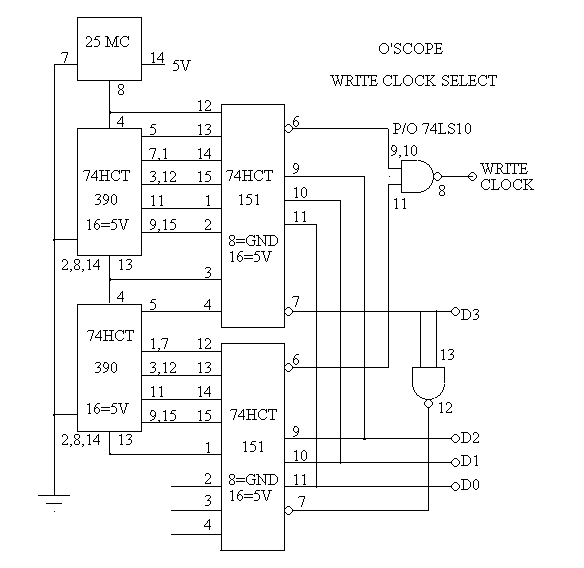
This is the schematic of the clock, I left out a third 74390 that really should still be there.
Here is the PCB from the last version of the Printer Port Scope that I am reusing with the Arduino.
I went looking for my old pictures and schematic on the Internet and somewhere around when Geo Cities closed down all of my old schematics were lost. I am now searching my old hard drives to try to find them.
This is the block diagram of the prototype. As you can see it was very complicated. I built it using wirewrap about 15 years ago.
This is the block diagram of the simplified version that was used for the printer port O'scope.
Here is the analog input section. I am in the process of adding a LF351 input buffer IC.
This is the schematic of the memory section. It has the A to D converter and a FIFO.
This is the schematic of the clock, I left out a third 74390 that really should still be there.
Here is the PCB from the last version of the Printer Port Scope that I am reusing with the Arduino.
Tuesday, January 3, 2012
Targus Universal Charger Repair
Recently I fixed a Targus Universal Charger. This is the second time I have worked on one of these. If only I could remember what the problem was the last time, I could save myself lots of work. The symptoms are that there is no power at the output jack, and changing the jack does not fix the problem.
First I checked the power cable and it had power on the yellow main conductor to the shield. So it had to be the jack right? As you can see in the picture I tore the jack all to pieces to no avail. The actual problem is that the interchangeable jacks are ALL bad! They have to be broken apart and then re-solder the center connector to the circuit board. You might want to re-solder the grounds too while you are in there.
I swapped the rebuilt jack to the AC adapter end in the picture.
The connection color code from the end with a metal plate is:
Red
White
Yellow-Power
Ground-Sield
Blue
First I checked the power cable and it had power on the yellow main conductor to the shield. So it had to be the jack right? As you can see in the picture I tore the jack all to pieces to no avail. The actual problem is that the interchangeable jacks are ALL bad! They have to be broken apart and then re-solder the center connector to the circuit board. You might want to re-solder the grounds too while you are in there.
I swapped the rebuilt jack to the AC adapter end in the picture.
The connection color code from the end with a metal plate is:
Red
White
Yellow-Power
Ground-Sield
Blue
Wednesday, December 28, 2011
The importance of "Title" tags in SEO
SEO had changed a lot over the years. At one time you could just say what your key words were and the search engines then used those words. A practice called "key word stuffing" eventually led to the search engines analyzing the text on your web site to find out what your actual key words are. Now it is widely accepted that your key words are also rated higher if they appear in links, headings, or titles. I have also been able to determine that Google places higher emphasis on web pages that have more inbound links. They also search PDF files for key words. If you put these together you can add PDF files to your web pages. People will then link to these PDF's and hence these pages will rate higher as they have lots more key words and inbound links. You can also add titles to your web pages and links within your pages and menu's to further add key words to your web site.
Recently I discovered that some web sites were adding "title" to their links. At first I thought this was strange, perhaps a way of stuffing key words into web pages. The standard procedure of looking for keywords in a web page is to strip all of the HTML code, that is everything between the less than and greater than symbols. Then analyze what is left for the key words. However after reading a SEO paper form Bing/Microsoft, Title tags are also analyzed for key words. I will have to update my Keyword Analyzer Tool (KAT) to add "Found in titles" as a column.
This is an excerpt from Bing WMC FAQ Page 23
Q: How can I apply keywords to linked pages when I use inline linking?
A: Normally the anchor text is your primary description of the linked page. But if you do inline linking within the paragraphs of your body text, you need to maintain the natural, logical flow of the language in the paragraph, which can limit your link text description.As such, you can use the title attribute of the anchor tag to add additional keyword information about the linked page without adversely affecting the readability of the text for the end user. An example might go something like this:
This is an example of < a href="http://www.mysite.com/newpage.htm" title="keyword or key phrase describing the linked page" > inline linking < /a > within a paragraph.
Monday, December 19, 2011
Vtech Vreader and MobiGlo display console
Someone recently was given a Vtech Vreader and MobiGlo display console and they wanted to know if the individual parts can be removed and used.
To start with I removed the battery back. It had 4 battery boxes of 16 "D" cells each that is a total of 64 "D" cell batteries! Then I unplugged and disconnected the stuff from below the cabinet. The brown wires go to the speakers, the three conductor wires go to the volume control (short the right two wires together for full volume) and the multicolor ribbon cables can be just cut off.
Next was to find really small speakers to fit into the devices. The built in battery holders were not wired up but the external power adapters were wired so I used an AC adapter to test them out. So far everything seems to work but the software might have been modified to prevent really using these devices as they were designed to be used. Next is to find a way to use these with smaller battery packs, perhaps 4 x AA cells?
To start with I removed the battery back. It had 4 battery boxes of 16 "D" cells each that is a total of 64 "D" cell batteries! Then I unplugged and disconnected the stuff from below the cabinet. The brown wires go to the speakers, the three conductor wires go to the volume control (short the right two wires together for full volume) and the multicolor ribbon cables can be just cut off.
Next was to find really small speakers to fit into the devices. The built in battery holders were not wired up but the external power adapters were wired so I used an AC adapter to test them out. So far everything seems to work but the software might have been modified to prevent really using these devices as they were designed to be used. Next is to find a way to use these with smaller battery packs, perhaps 4 x AA cells?
Saturday, December 10, 2011
"Gay Rights" versus "Religious Freedom"
This week the US government stopped all funding for a program that had been promoting Religious Freedom around the world. On the very same news cast they also announced that, via executive order, federal funding will be cut off from any nation that does not support "Gay Rights".
Then on Saturday I sat down and watched the science channel video called "Biblical Mysteries Explained examines the tale of Sodom and Gomorrah". I knew they had excavated Sodom and had determined the it was in fact destroyed by fire and brimstone. Basically the buildings show burn holes in them from small objects that were at 400 to 500 degrees on impact. The people died in agony as they were set on fire. After watching the TV episode I now also know that they have records of a meteor track that was observed around 3125 BC, and that people digging up ice cores around the world have found evidence of a "nuclear winter" around 3200 BC. What was kind of funny is that while they were proving the Biblical record to be true they were also referring to the story of Sodom as a "tale" and referring to the time as being "BCE".
Here is a link to some of the Archaeological Evidence for Sodom:
http://www.assistnews.net/Stories/2011/s11120037.htm
The article is titled "Archaeological Evidence for Sodom: Recent Findings Shed Light on Discoveries of ‘Biblical Proportions’"
Here is the Science channel Video:
http://store.discovery.com/biblical-mysteries-explained-dvd/detail.php?p=98330
Then on Saturday I sat down and watched the science channel video called "Biblical Mysteries Explained examines the tale of Sodom and Gomorrah". I knew they had excavated Sodom and had determined the it was in fact destroyed by fire and brimstone. Basically the buildings show burn holes in them from small objects that were at 400 to 500 degrees on impact. The people died in agony as they were set on fire. After watching the TV episode I now also know that they have records of a meteor track that was observed around 3125 BC, and that people digging up ice cores around the world have found evidence of a "nuclear winter" around 3200 BC. What was kind of funny is that while they were proving the Biblical record to be true they were also referring to the story of Sodom as a "tale" and referring to the time as being "BCE".
Here is a link to some of the Archaeological Evidence for Sodom:
http://www.assistnews.net/Stories/2011/s11120037.htm
The article is titled "Archaeological Evidence for Sodom: Recent Findings Shed Light on Discoveries of ‘Biblical Proportions’"
Here is the Science channel Video:
http://store.discovery.com/biblical-mysteries-explained-dvd/detail.php?p=98330
Thursday, December 8, 2011
Possible Super Volcano at Geysers California
A few years back there was a lot of talk about the Yellowstone Super Volcano possibly becoming active and causing a really huge disaster. I have been commenting for years now that the Super Volcano at Geysers California is having far more earthquakes than Yellowstone. In fact there have been over 121 earthquakes in Geysers California just this week alone. There have been two earthquakes that exceeded 3.0! IMO the super volcano at Geysers is far more likely to blow in the next few months that Yellowstone is.
I do not know why no one else in the media is even noticing these earthquakes. A Super Volcano in California would be even a bigger disaster than Yellowstone because of its close proximity to highly populated areas like San Francisco! Also a Super Volcano in Geysers California would spread ash and dust all across the USA just like one in Yellowstone would. That would result in cooling the temperatures and destroying crops all across the country!
Sunday, December 4, 2011
Combined Aggregate Web Site
A few years back I developed a Key Word Analyzer (KAT) tool. It is at www.davismission.org/keyword
Now I am working on another feat of web programming that I call a "CAF" web site. Imagine having your Facebook, YouTube, Ebay, Twitter and many more sites all aggregated onto one web site.
I am developing what I call a Combined Aggregate Feed (CAF) Web Site to bring several of my web sites together into one location. What do you think is the best Three Letter Acronym (TLA) for this kind of web site? It is a work in progress and can be found at http://www.davismission.org/bobdavis321/
This was not easy and just doing an < object data="web site" > because that does not work for a lot of web sites. For example for Facebook you have to create a "Badge" then link that badge into your web site.
The code for twitter is a Java script that looks like this:
new TWTR.Widget({
version: 2, type: 'profile', rpp: 4, interval: 30000, width: 'auto', height: 400,
theme: {
shell: { background: '#333333', color: '#ffffff'
},
tweets: { background: '#ffffff', color: '#000000', links: '#880088',
}
},
features: { scrollbar: false, loop: false, live: false, behavior: 'all'
}
}).render().setUser('bobdavis321').start();
To get the scoop on how I did it all just right click on the web site and select "reveal code" or "reveal page source" in Firefox..
Now I am working on another feat of web programming that I call a "CAF" web site. Imagine having your Facebook, YouTube, Ebay, Twitter and many more sites all aggregated onto one web site.
I am developing what I call a Combined Aggregate Feed (CAF) Web Site to bring several of my web sites together into one location. What do you think is the best Three Letter Acronym (TLA) for this kind of web site? It is a work in progress and can be found at http://www.davismission.org/bobdavis321/
This was not easy and just doing an < object data="web site" > because that does not work for a lot of web sites. For example for Facebook you have to create a "Badge" then link that badge into your web site.
The code for twitter is a Java script that looks like this:
new TWTR.Widget({
version: 2, type: 'profile', rpp: 4, interval: 30000, width: 'auto', height: 400,
theme: {
shell: { background: '#333333', color: '#ffffff'
},
tweets: { background: '#ffffff', color: '#000000', links: '#880088',
}
},
features: { scrollbar: false, loop: false, live: false, behavior: 'all'
}
}).render().setUser('bobdavis321').start();
To get the scoop on how I did it all just right click on the web site and select "reveal code" or "reveal page source" in Firefox..
Subscribe to:
Posts (Atom)